Reading a competitor off their public data
A local competitor leaves almost their whole strategy in public. Category, review velocity, photo cadence, the attributes they claim, whether they bothered with a website — all readable, free, by anyone who looks in the right order. What is not readable is who "they" are, because there is no single they.
This chapter gets you an honest competitive set, teaches you to read it, and shows you how to spot a listing winning by breaking Google's rules rather than by being good.
There is no leaderboard
The instinct is to ask "who are my top five competitors?" and expect a list. There isn't one, for the same reason there is no single rank: rank is a surface, not a number.
The set is a function of the keyword and the searcher's position. Two miles east, a different three businesses hold the pack; change emergency plumber to boiler repair and half the set changes again.
The useful question is "who is above me, for which query, from where" — and you have already paid for the answer. Every ranked search returns an ordered list, and the order is the measurement; reading who sits above your row costs nothing extra.
Position is the cheap part of local data (what the Places API will and will not give you explains why the rich profile fields are not).
Three sets, not one
Conflating them is the most common analytical error here.
| Set | Who is in it | What you do with it |
|---|---|---|
| Map-pack rivals | The businesses above you for a keyword from a point | Track formally |
| Organic rivals | The pages ranking for the same query, usually directories | Treat as a citations problem |
| AI-answer rivals | The businesses an assistant names when asked | Read as a cross-check |
The overlap is smaller than people expect, because proximity barely constrains an AI answer and organic rewards pages rather than places.
What a public listing tells you
Every rival exposes the same short list of fields. Each answers one question about their strategy.
| Field | The question it answers |
|---|---|
| Primary category | What Google thinks they are, and whether they contest your query on purpose |
| Rating | Whether quality is their lever |
| Review count | How long they have worked on reputation |
| Photo count | Whether anyone tends the profile at all |
| Website / no website | Whether the listing is the whole business |
| Attributes | What they claim to offer that you may not |
| Distance | Whether they are a real rival or an artefact of your radius |
Read them in that order and a strategy falls out in a sentence: same category, half my reviews, twice my photos, no website is a profile-only operator.
The comparison card does the arithmetic — your value, the set average, the best rival's — and To beat them turns each shortfall into a sentence with a number in it. The average is a realistic target; the best rival usually is not.
Attributes deserve their own line. Rivals declare amenities, accessibility and parking publicly; subtract yours from theirs and the remainder — Competitors offer — you don't — is the cheapest actionable output on the page, because often you do offer the thing and never ticked the box. Claim only what is true.
Level is history. Slope is strategy.
A review count is a fact about the past several years. It says where a business got to, not what it is doing now. There is no public source for the derivative, because Google does not publish a listing's history.
You can only have the movement you recorded.
That is what snapshots are for. A snapshot captures one rival's rating, review count and photo count at a moment. One is a level; two are a slope. Almost everything interesting here — deltas, the sparkline, the momentum term in the threat score, the activity feed — needs two.
Hence a boring fixed cadence rather than snapshotting when you are curious. Fortnightly is a workable default (inference: there is no published measurement of how fast these fields move, so the value is in keeping the interval fixed, not in the interval itself).
Movement also drives the activity feed, on thresholds worth knowing. Between snapshots, it fires on:
- a rating fall of 0.3 or more (high severity);
- a rise of 0.5;
- 20 new reviews;
- 10 new photos;
- a fresh review of two stars or fewer.
All of them are per-rival and gated on the bell — Alerts on / Muted on each rival's card. Muting keeps the rival tracked and keeps its snapshots and metrics updating; what stops is the alerting, including the extra review fetch the review alert needs.
Scoring the threat, published so you can argue with it
Each tracked rival carries a threat score from 0 to 100. Here is the whole formula, because a score you cannot audit is one you should not show a client:
- Rating edge — 30 points, all or nothing, if their rating is above yours.
- Review volume — up to 40 points: their review count divided by yours, times 20, capped at 40. Matching your volume scores 20; double it is the full 40.
- Momentum — up to 30 points, needing two snapshots: 20 if they gained more than 10 reviews since the last capture, plus 10 if their rating rose more than 0.3.
70 and above is high, 40–69 medium, below 40 low.
Notice what it does not contain: position. It is a prominence-and-momentum score, deliberately, because prominence is what you can read from outside and distance is what you cannot change. A rival can score 100 and be irrelevant if they sit outside the area you serve, so read the score next to the distance.
The flags beside it are often more useful. Beats you means a higher rating than yours.
Catching up starts from a volume test — the rival has fewer reviews than you, so rivals already bigger are excluded by design, because they are ahead, not catching up. It then fires on any one of three things:
- they gained reviews since the last snapshot;
- their rating rose;
- or their rating already matches or beats yours.
That last clause is why a rival can show as catching up on a single snapshot, before there is any movement to measure. That filter is the early-warning list, and the one most people never open.
Reading a listing that is winning by breaking the rules
Sometimes the business above you is not better. It is a keyword-stuffed name on a virtual office with fourteen reviews that all arrived in March.
Detection is heuristic, so score signals rather than declare verdicts. Here is the full scoring behind the spam check, published so you can run the same reasoning by hand in any market:
| Signal | Trigger | Weight |
|---|---|---|
| Duplicate listing | Near-identical name to another listing in the set, or a near-identical address paired with a related name | 3 |
| Keyword-stuffed name | A promotional term in the business name (best, #1, cheap, near me, 24/7, top rated, call now, 100%, ™), or two of: three or more separators, over 60 characters, over nine words | 3 |
| Suspicious rating | 4.8★ or higher on at least one but fewer than ten reviews | 3 |
| Thin profile | Zero reviews and zero photos | 2 |
| No website | No website linked | 1 |
Add the weights. Under 2, say nothing — a lone "no website" is not a finding. 2–4 is Review: one real signal, worth a look.
5 or more is the escalation threshold, set there because 5 cannot be reached by any single signal; it takes two independent ones. One anomaly is a business; two anomalies are a pattern.
The weights encode how hard each signal is to explain innocently. A duplicate pin, a stuffed name and an implausible rating are difficult to reach by accident; a thin profile is what a legitimate new business also looks like; no website is normal. Copy the table, adjust the weights if your market justifies it, but keep the two-signal rule.
The scan cannot scan the market: it runs over the rivals you track, which makes it free and blind to everything you have not added.
And a flag is not proof — verify by hand before reporting anything (Spam and fake listings).
The competitive set the AI picked
Here is the part almost nobody exploits. An AI answer check puts an unbranded local question to an assistant — someone near this location asks "emergency plumber"; recommend specific businesses — and the answer names several. Every name in it but yours is a competitor the engine chose, and you have already paid for it.
Those names are tallied as co-mentions: businesses appearing alongside (or instead of) you across recent answers, with a count and a tag for local business, chain or platform. Reading the tally is free.
Two things make it worth more than it looks.
The names come only from answers that actually recommended somebody — refusals, generic advice and "check Yelp" punts leave the denominator entirely (how an AI answers a local question).
And the tally spans several runs, because identical prompts return different lists on repeat: a name in one answer of five is noise, a name in four of five is a market fact. (Inference: where to draw that line is judgement, not a measured constant.)
Platform rows are not rivals. Yelp surfacing in an answer is a citations signal: it names the directory the engine reads for your queries, far more targeted than "build citations" (AI visibility).
What you cannot see, and why
-
A rival's full review history is not public. Without owner access, the reviews readable on any business are a sample of at most five, sorted by relevance — Google's Places reference states the cap and the ordering outright.
Their count and rating are exact; their review corpus is not, and nobody selling you a report has it either. Every ratio computed over that sample has a denominator of five or fewer (What Google's reporting hides).
-
Their performance data is invisible. Impressions, calls, direction requests, search terms — all require owning the profile. Anyone showing you a rival's traffic is modelling, not measuring.
-
Stored competitor data expires, and the reason is stricter than the folklore. The rule the industry repeats — that you may cache Places data for thirty days — is not in Google's terms; the default there is no caching of Places content at all, with place IDs exempt and coordinates allowed for up to 30 consecutive days (Storing Google data legally).
Competitor history is therefore a short rolling window that any tool has to refresh or purge, not an archive it is entitled to keep. Export as you go if a report needs longer.
-
Some rivals are structurally invisible. A pure service-area business with a hidden address never appears in the search discovery uses (Service-area businesses). Very new listings can be missing too, since discovery ranks by prominence — if you know the name, search for it directly.
Labs
Lab 16.1 — Find out who is actually above you
Lab · Where: Competitors (
/b/{businessId}/competitors) · Cost: paid · Time: ~10 minYou need: Lab 0.3 — a business added. Ideally Lab 3.1 too, so the keyword-evidence line has something to read.
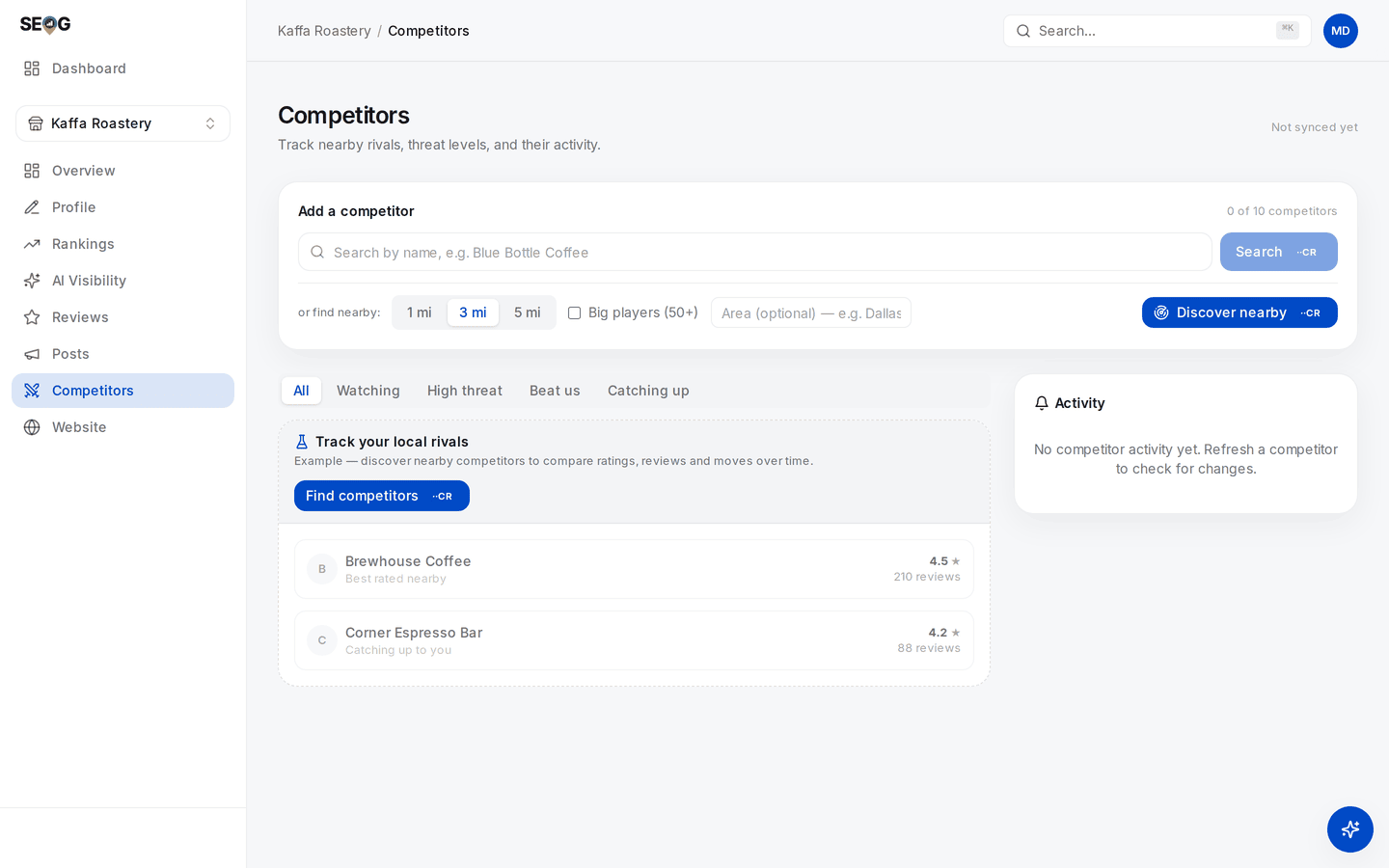
Competitors before anything is tracked. Discovery is the top card — radius chips, Big players (50+), and the optional Area box for a business with no map point — and the filter row above the list is where Beat us and Catching up live. The two coffee shops underneath sit under an Example header: the interface illustrating what a tracked rival looks like, not real rivals and not real numbers.
- Open Competitors. In the Add a competitor card, find the or find nearby row: radius chips 1 mi / 3 mi / 5 mi, a Big players (50+) checkbox, an optional Area box. Leave the radius at 3 mi. If your business has no map point (a service-area business), type a town into Area — otherwise the search has no centre.
- Press Discover nearby: a live ranked search, priced on the button.
- Read the summary line above the results first: either
You rank #N in this search — anything above that line already beats you, or that you did not appear in the top 20, meaning everything listed outranks you. That sentence is the finding. - Read each row's rank chip —
#7 · above you (you #11). Where a rival also appears in your stored rank checks, a second line reads like beats you for 2 of 3 tracked keywords it appeared in. Treat that as a floor: a rank check records only the top three rivals it saw, so a rival that consistently sits fourth leaves no trace there at all. - Press Track on three rivals that genuinely contest you: above you here, same primary category, inside the distance your customers travel. Not the three biggest names in the city.
What good looks like. Three tracked rivals — at least one that outranks you, at least one you outrank — plus a sentence per rival naming which force they win on.
If it went wrong. A thin list means the radius is too small or the category unusual; widen to 5 mi and discover again (another paid search). A list of one-review listings is what Big players (50+) is for. A named rival that never appears is what the by-name Search box is for — also paid, returning no rank position.
What you just learned. The ranked list already answers "who is above me" — the order is the measurement, and reading it costs nothing extra.
Lab 16.2 — Snapshot, then read the comparison
Lab · Where: Competitors (
/b/{businessId}/competitors) · Cost: paid, then free reads · Time: ~15 min, plus a revisit next weekYou need: Lab 16.1.
- On each tracked competitor card, press Refresh — a live fetch of their rating, review count and photo count, priced on the button.
- The card now shows a level and no deltas. Correct: one snapshot is not a trend. Diarise a second pass in a week — after seven days the page offers a section-wide Refresh competitors for the whole set at once.
- Read You vs. competitors (N) in the right column — free, from stored data: Rating, Reviews and Photos, each with your value, the set average and the best rival's. Then read To beat them and write those numbers down — they are your targets for reviews and photos.
- Read Competitors offer — you don't. For each chip: do we offer this? Every yes is a profile fix, not a competitive gap.
- Read the Market positioning scatter. You are the ★; top-right — more reviews and a better rating — is the quadrant that matters.
What good looks like. One sentence diagnosing the set, with numbers: "I lead on rating by 0.2, trail the average by 40 reviews and 12 photos — the constraint is volume, not quality."
If it went wrong. No comparison card means nothing is tracked yet. A rival with a blank name has aged past the storage window and needs a refresh. Deltas that stay empty mean only one snapshot was ever taken.
What you just learned. Levels are free to read forever; slopes must be bought once, then recorded.
Lab 16.3 — Run the spam scan and classify every finding yourself
Lab · Where: Competitors → Spam check (
/b/{businessId}/competitors) · Cost: free · Time: ~15 minYou need: Lab 16.1 — at least one tracked rival.
- Find Spam check in the right column. It reports how many rivals it scanned and how many are worth reviewing, and makes no external calls.
- Before reading its labels, score each flagged rival by hand with the weights table above.
- Compare with the panel's label — Review or Likely spam — and note any disagreement.
- For anything you scored 5 or more, verify: search the exact name in Google Maps, check the address on street view, call the number.
- Write a one-line verdict per rival: legitimate, sloppy, or likely spam, verified. Only the third is worth reporting.
What good looks like. A short list where you disagree with at least one machine verdict and can say why. A heuristic you cannot overrule is one you are not using properly.
If it went wrong. "No spam signals" is a common, legitimate outcome, not a failed scan. If everything is flagged, check whether you tracked several branches of one chain — that trips the duplicate signal by design.
What you just learned. Spam detection is scored evidence, not a verdict.
Lab 16.4 — Take the competitive set the AI picked
Lab · Where: AI Visibility (
/b/{businessId}/ai-visibility) → How AI recommends you · Cost: free · Time: ~10 minYou need: at least one live AI answer check run from the keyword × engine matrix (Lab 5.1 tours that screen).
- Open AI Visibility and scroll to Who AI recommends alongside (or instead of) you. Each row: a name, its answer count, and — where the name could be classified — a tag reading Local, Chain or Platform. Unclassified names carry no tag; they are not a separate category, just an unresolved one.
- Cross off every name you already track. What remains is a competitive set you did not choose.
- Move the Platform rows to your citations worklist; they are sources, not rivals.
- Track the one or two most frequent Local names (paid), then ask whether they appear in your map-pack set at all.
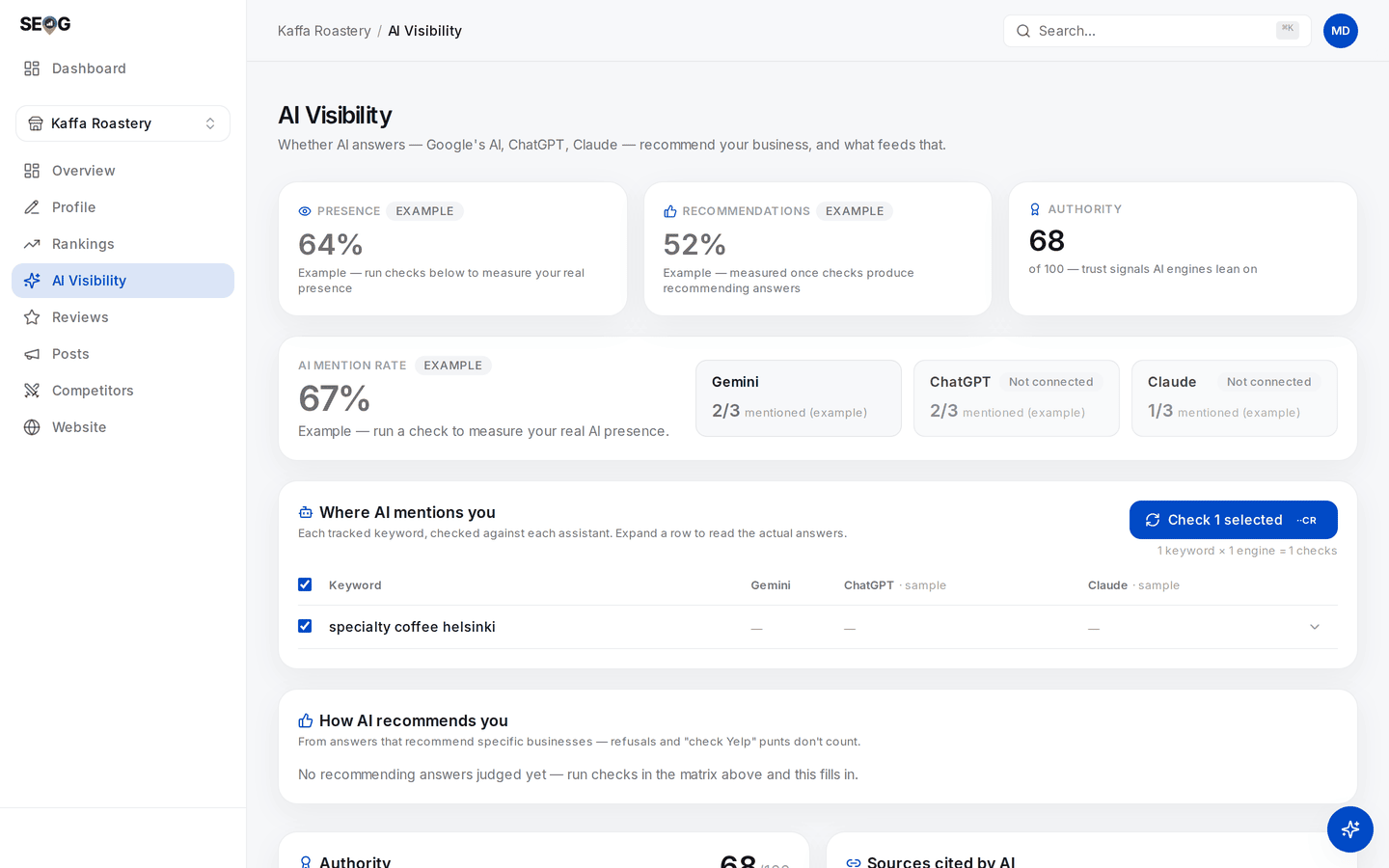
This is the page before a single live check has run, and it says so: every headline figure carries an EXAMPLE badge, and How AI recommends you reads "No recommending answers judged yet". Nothing here is a measurement of this business — the co-mention list this lab is after only exists once you have paid for real answers.
What good looks like. At least one name here that never appears in your map pack. If the two sets are identical, that is also a finding: the engine is reading the pack, so your pack work covers both surfaces.
If it went wrong. An empty list means no answers have been judged as recommendations yet; check more keywords. If the section shows clearly-labelled example numbers instead of your data, live AI checks are not on your plan — Lab 5.3 is the by-hand version.
What you just learned. An AI answer check is two deliverables for one spend: your presence, and a competitor list the engine picked.
Without SEOG. All four labs work by hand: Google Maps for pack order, categories, ratings, review counts, photos and attributes; a spreadsheet with a date column for the slope; the spam table needs only eyes; the co-mention list needs an assistant and five identical prompts. What you lose is the recording discipline — exactly the part that fails. Doing it without SEOG is the long version.
Common mistakes
Tracking the biggest business in town. Their threat score pins at 100 and never moves, and nothing you learn is actionable. Track one tier above you and one below — the tier below is where the surprises come from.
Copying a rival's primary category because they outrank you. You are crediting one variable for the output of many. Uniform categories across the pack with yours the odd one out is evidence; a single rival is not.
Reporting a listing because a tool flagged it. Redressal burns credibility when it fails. Verify by hand, keep the evidence, report only what you would defend.
Check yourself
- Name your three competitor sets and one member of each that is in no other. If all three lists are identical, you have built only one of them.
- A rival scores 82 on threat. Give the two likeliest breakdowns. (Rating edge plus double your volume — established, slow to move. Or moderate volume plus full momentum — a campaign running now, the urgent one.)
- Which rival is "catching up", and how is that different from "beats you"? (Catching up: smaller than you on review volume, and either gaining reviews, gaining rating, or already at or above your rating. Beats you: a higher rating, full stop. A rival can be both, or neither.)
- A listing in your pack has a stuffed name and no website. Do you report it? (No — 3 + 1 = 4, below the escalation threshold. Watch it; report when a second signal appears.)
- A rival's review count jumped 40 in a week. Name an innocent explanation before you reach for the guilty one. (A request campaign after a backlog, a seasonal surge, or a filtered batch released. Purchased reviews is the claim that needs evidence.)