Building a tracked set that tells the truth
A tracked keyword set is a sample. You cannot measure every query that could produce a business, so you pick a handful and treat what they do as evidence about the rest. That is what a pollster does, and it fails the way a poll fails: not by measuring wrong, but by measuring the wrong people and reporting the result with a straight face.
Most sets in the wild are not samples. They are wish lists with a bias baked in — the terms someone hoped to rank for, plus the ones that looked good on the first report. Such a set produces numbers that are true and meaningless.
Chapter 6 gave you a set built from your own vocabulary and a suggestion list. This chapter replaces the guesswork with Google's own record of what people typed, prunes what is left to rows that can tell you something, and then decides how often to look.
What the sample unit really is
The first correction — a tracked row is not a phrase. It is a phrase measured from a point, in a language. Confirm it in the app rather than take it on faith: adding the same phrase with a different Search from location produces a second, independent row with its own history, not an edit of the first.
Identity is the combination: business, phrase, location, language.
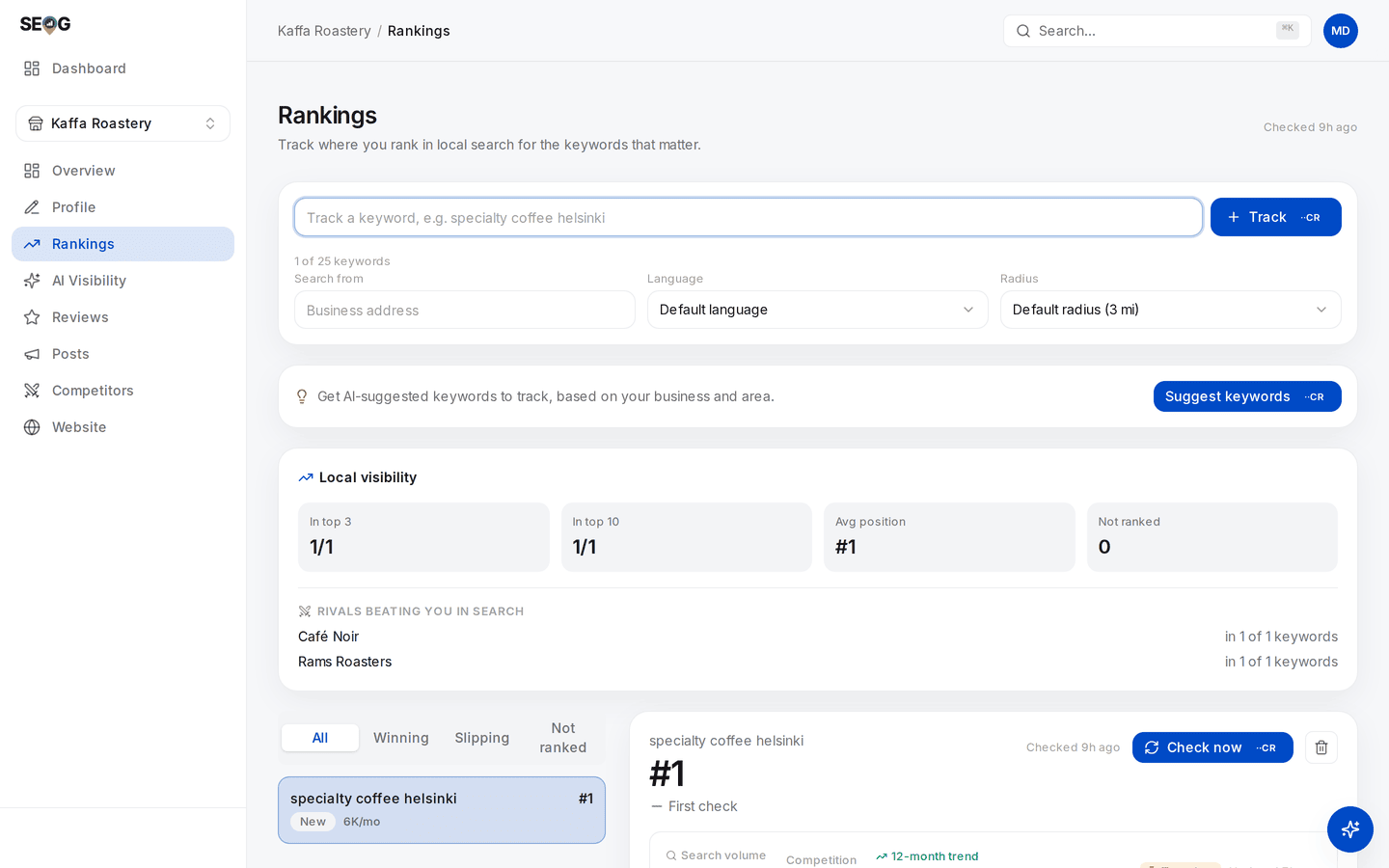
The add form is the identity rule made visible: the phrase, plus Search from, Language and Radius. Re-enter the same phrase for the same point and it is refused — "Already tracking this keyword here" — while the same phrase from another origin is accepted as its own row. Note the Local visibility card below: with one keyword tracked, every figure reads 1/1 and #1. That is a property of the sample, not of the business.
Distance is one of the three forces (relevance, distance, prominence), so "where you rank for plumber" is not a fact about your business. It is a fact about your business at a coordinate.
Two rows for one phrase from two neighbourhoods are two observations. plumber and plumbers from the same door are one observation billed twice.
The second correction is depth. It is the censoring rule from rank is a map, not a number applied to a keyword list rather than a grid. A rank check reads the top of the local results — here, the top twenty — so Not ranked means not found in the window we looked at, and the truth could be 22, or 400, or nowhere.
That matters the moment anyone averages your positions. Never write a number where the tool wrote nothing.
Note · If your practice business is a pure service-area business — a trade with a hidden address — keyword rank checking cannot work for it at all, in this tool or any other built the same way. That is structural rather than a bug, and it has its own chapter. The cadence and sampling parts here still apply to it.
The one source that is not a guess
If you have owner access to the profile, Google will tell you the search terms that actually produced it — not estimates, not a national planner average, but the queries that put this business in front of somebody.
It replaces trade vocabulary with customer vocabulary and surfaces terms stranger than anything you would have invented, and almost nobody consults it before building a set.
It has three properties that most reporting quietly ignores.
It is a survivor's list. Every term in it is one you already appeared for. A query where you were invisible produced no impression, so it is not in the report and cannot be. That makes it excellent for fixing your words and useless for finding your gaps. Gaps come from the other direction: the intent cells you have not filled (chapter 6) and who sits above you.
There is no month attached to a number. Ask for a window and you get one line per term with one total for the whole window. Not a series, not twelve points — one number, with no month field anywhere in it.
Google's own developer reference for owner-side keyword reporting defines the figure as "the sum of the number of unique users that used the keyword in a month, aggregated for each month requested" — one aggregate per term across the whole requested range. (Google Business Profile Performance API reference, checked 2026-07-27.)
The only honest way to build a month-by-month trend is to ask for each month separately, twelve times, and stack the answers yourself.
Note the unit while you are there: it counts unique users per month, summed — not raw searches and not sessions. The app's column is headed Impressions, which is the industry word for it, but two people searching the same term forty times each is not eighty.
The consequence is uncomfortable. A month-over-month keyword chart built from one request is placing values in months Google never put them in: either the tool made twelve requests, or the chart is decoration.
The honest version is in the lab below — the card starts as a plain Keyword / Impressions table labelled trailing 12 months, and grows Trend and Last month columns only once you buy the twelve separate asks. The mechanism is in what Google's reporting hides.
Low-volume terms come back as a ceiling, not a count. Google withholds exact counts below a privacy threshold and returns the threshold instead — those cells render as <40 rather than 40 (40 is an example; the threshold is Google's and Google does not publish it), because the real number is below what is shown.
This is documented rather than inferred: for each keyword Google returns either an actual value or, in its own words, "the threshold below which the actual value falls". A thresholded cell is therefore an upper bound by definition, not an estimate. (Google Business Profile Performance API reference, checked 2026-07-27.)
Your long tail is a set of upper bounds, and any total summed from them is one too. Label it on a client report: "under 40" and "40" look similar, and one of them you cannot defend.