The profile is the product
Your Google Business Profile is not a marketing page describing the business. It is the record Google ranks, and its fields are the raw material every local ranking decision is made from. Edit a field and you are editing the thing itself, live, in front of customers.
That makes this the highest-leverage chapter in Part II and the one with the sharpest edges. Some fields you can change on a Tuesday afternoon with no consequence beyond a ten-minute wait. Three of them can take your listing off Google for days. Nobody tells you which is which until it happens.
The fields, in order of leverage
| Field | What it does | How fast it moves |
|---|---|---|
| Primary category | Decides which queries you are a candidate for at all | Immediately, once published |
| Additional categories | Widen candidacy — and dilute the primary signal | Same |
| Name | Identity; also a keyword surface people abuse | Same |
| Services | Fill out relevance under the category | Fast to publish, small in effect — Sterling Sky reports query changes in 24–72 hours |
| Description | Conversion and machine-readability | No direct ranking effect |
| Hours | Eligibility for "open now" filtering | Immediately |
| Attributes | Structured facts: delivery, step-free entrance, card payments | Immediately |
| Photos | Conversion, and a completeness signal | Slow |
Primary category decides candidacy
Category does most of the work. It is the only field where you pick from Google's own fixed vocabulary instead of typing prose — it answers "what kind of thing is this" in a form a machine does not have to interpret.
The three forces covers the mechanism. The operational point is blunter:
A wrong primary category is not a small loss of relevance. It is exclusion. You are not ranked badly for the query — you are not a candidate for it.
Lab 3.3 had you compare yours against the pack's. If that produced a mismatch, fix it before anything else in this chapter.
Additional categories are the tempting part. Each one is another set of queries you become a candidate for, which sounds free.
It is not. Two separate costs:
- Policy. Google's Guidelines for representing your business on Google require categories that actually apply. Google reserves the right to restrict content, restrict access to the profile, or suspend the account when they do not — so a category for something you do not provide is a violation with a real enforcement path.
- Dilution. Extra categories also blur what the profile is about. This one is the industry's consistent read rather than anything Google states (inference).
The test: add a category only where a customer could walk in and buy that thing today.
The name field, and the keyword temptation
Your name field must be your real-world business name — the one on the signage, the invoices, the door. That is Google's rule, not a convention: the Guidelines for representing your business on Google require the real-world name, and Google's redressal form exists for exactly this complaint.
Now the uncomfortable part, which beginners collapse into one idea when it is two:
| Is it true? | |
|---|---|
| Keyword-stuffed names ("Smith Plumbing | Emergency Plumber Tampere") rank better | Yes — observed constantly, in every market (no controlled public study quantifies it) |
| They are against the guidelines and get reported | Also yes — it is among the patterns most often submitted to the redressal form |
Both halves hold at once. It works, and it is the single easiest thing for a competitor to escalate against you. Spam and fake listings covers that machinery from both sides.
Services: small, real, cheap
Below category the evidence thins out — and the honest summary of it is qualitative, not a number. Sterling Sky's published testing, cited in The three forces, concluded that Google's pre-defined services do affect which queries a profile ranks for, reversing their own earlier 2019 finding.
It reported the effect in words rather than percentages ("varies based on the industry and market", changes typically visible in 24–72 hours), from client case examples rather than a controlled test with a stated sample.
If you have seen a "2–5% of ranking impact" figure attached to that study — this manual carried it until 2026-07-27 — it is not theirs: it traces to a reader comment under the article, and no published measurement supports it. (Corrected against the primary source, 2026-07-27.)
So: small, nearly free, twenty minutes. A good use of a Tuesday and a bad thing to build a strategy on. Services are edited in Google's own profile editor; SEOG's editor does not cover them, and this manual is not going to pretend otherwise.
Description: not a ranking field
The description is capped at 750 characters — Google's own figure, in its help pages, which also tell you to keep URLs and HTML out of it. It does not appear to move rankings (inference — no controlled test has shown it does, and Google has never claimed it).
It does two other jobs:
- It converts. It is the only place on the listing where you speak in your own voice.
- It is machine-readable text about what you do and where — which matters more every quarter as assistants assemble local answers from entity data rather than from a ranked list (How an AI assistant answers a local question).
A trap most tools do not surface. The description in a public place record is not the one the owner wrote. What the public feed carries is Google's own editorial summary — Google's help centre is explicit that "our writers compile editorial summaries" and that, "unlike business descriptions, editorial summaries can't be edited".
The owner's text is a different field, lives on the owner side of the profile, and needs an authenticated connection to read back. (Google Business Profile Help, "Understand business summaries on Google Maps"; confirmed against a live owner-side read, 2026-07-27.)
So you cannot audit a competitor's description from public data, and a tool refreshing from public data alone will show you a description you did not write. SEOG re-reads the owner's real text when the profile is connected — one of the concrete things connecting Google buys.
Hours are a ranking field in disguise
Hours look like housekeeping. They are a filter. Maps offers an "open now" refinement, and a profile with no hours cannot be returned under it at all — an eligibility question rather than a ranking one. (How heavily searchers use that filter is not something Google publishes, so treat any percentage you see attached to it as invented.)
Missing hours also read as an abandoned listing. Holiday hours matter more than regular ones for one week a year, and that week is usually when demand peaks.
Attributes are a catalog you do not control
Attributes are the tickable facts — wheelchair-accessible entrance, accepts cards, offers delivery. Two things about them are not obvious.
The available set is decided by your category, not by you. Google publishes a different attribute catalog for a dental clinic than for a taqueria, and for some categories a whole group is simply empty.
If your category offers no accessibility attributes, no amount of effort adds one, and any audit demanding you "add accessibility info" is asking for the impossible. SEOG reads the live catalog for your category and marks the group not applicable when it comes back empty — you will see that in Lab 9.1 if your category is one of them.
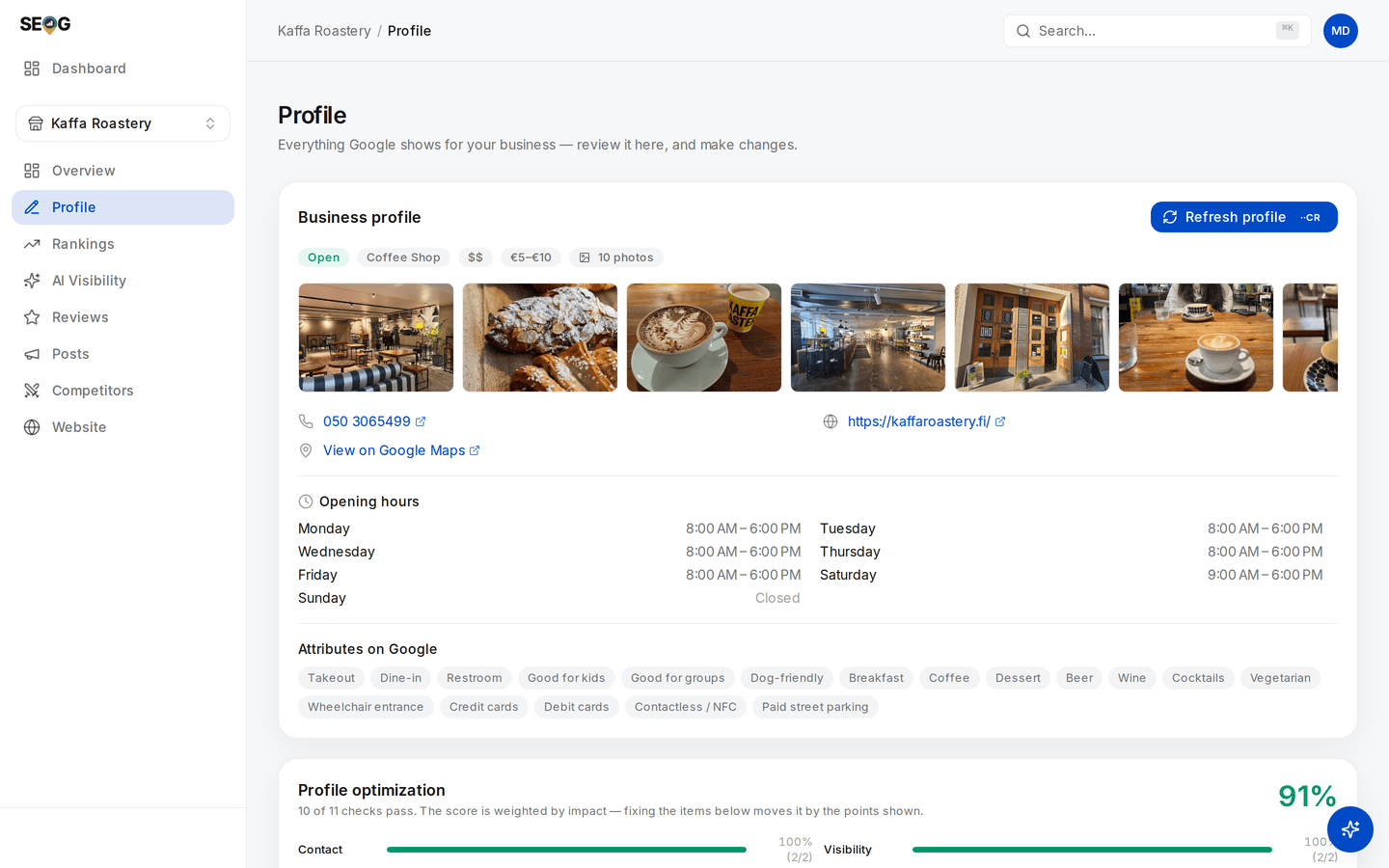
Look at the Attributes on Google row. The owner chose which of those chips to tick; they did not choose which chips exist. Every one comes from Google's catalog for Coffee Shop, and a dental clinic's card has a different set.
Removing an attribute is a different operation from leaving it out. The underlying write distinguishes "this is false" from "no value set", and clearing one requires naming it explicitly. In practice: untick and re-apply, rather than applying a shorter list and assuming the rest vanished. The mechanism is in Write limits and failure modes.