Ninety-day plan labs: build the calendar
Three labs turn the plan into something dated: rebuild the generated action plan as a calendar, start the slowest clock in week one, and book the measurement dates before you book the work.

Why a priority list is not a plan. The long bar is the review work — the aggregate clock, slow whatever you spend on it, so it has to start at tick one. The short bars are the profile fixes that dominate any impact-ordered list and take an afternoon. Sorted by impact, the short bars go first and the long one starts in week six, which is how a quarter ends with the work done and nothing measurable to show for it.
Labs
Lab 27.1 — Rebuild the action plan as a calendar
Lab · Where: Overview (
/b/{businessId}/overview) · Cost: free · Time: ~25 minYou need: your practice business diagnosed and a frozen baseline (Lab 7.3).
- Open the overview and read Action plan — your next steps. Press nothing else — this list is computed from stored data and costs nothing to read.
- Copy every item into a table, in the order shown, with its impact label and its
+N ptsvalue where it has one.
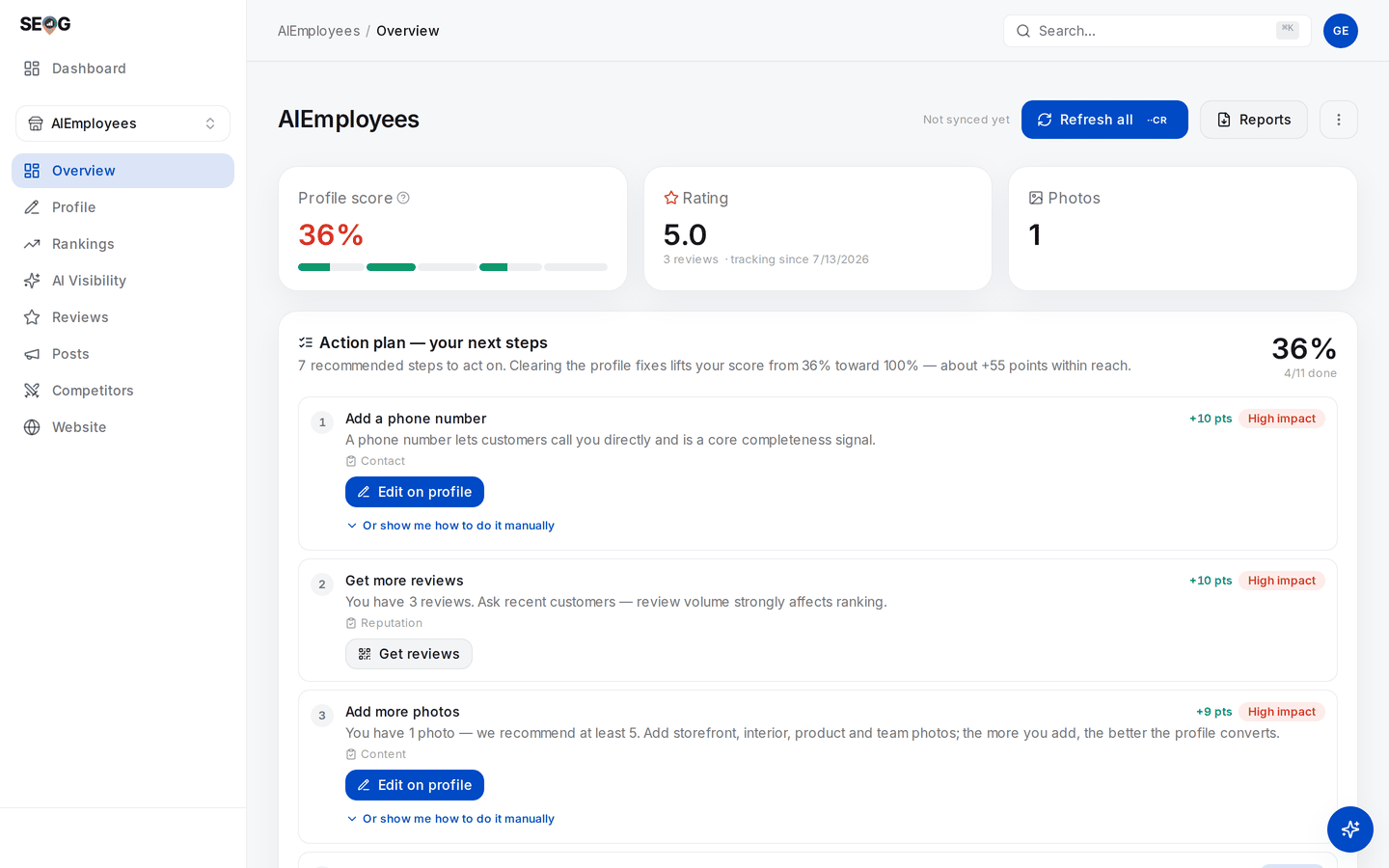
The list step 2 copies, in the order the app gives it. Notice what that order is doing: Get more reviews sits at number 2 on +10 — correctly, by recoverable weight — beside Add a phone number, which is also +10 and takes about ninety seconds. Nothing on this screen knows that one of them finishes today and the other takes a quarter. That is the whole job of the next three steps.
3. Add four columns and fill them in yourself: clock (write / behaviour / aggregate), owner (you / client / developer), risk (safe / re-verification), earliest useful start.
4. Re-sort by earliest useful start, ascending, breaking ties with impact.
5. Assign each row to a week number, 1 to 12. Every aggregate-clock row lands in week 1 or 2.
6. For each row whose position changed, write one sentence on why the generated order was wrong for this business.
What good looks like. At least one item moved up because it is slow rather than important, and at least one High-impact item moved down because it takes ninety seconds. Every review-related row is in week 1.
If it went wrong. The plan is empty — the profile passes its checks, so your quarter is about reputation, website and rank rather than completeness; build the calendar from your rank map instead. Several rows are unknown rather than failing: you are not connected to the profile, which is a day-0 task.
What you just learned. A prioritised list and a schedule are different objects. Priority answers "what matters most"; a schedule answers "what must start now so it can finish". Only the second is a plan.
Lab 27.2 — Start the slowest clock in week one
Lab · Where: Overview (
/b/{businessId}/overview) · Cost: free · Time: ~15 minYou need: Lab 27.1.
- In the action plan, find the review item — Get more reviews, Improve your rating or Reply to your reviews. If its description mentions a fresh review counting double, the recency factor collapsed into it.
- On a review-volume or rating item, press Get reviews. Copy the link and download the QR image.
- Write the deployment, not the intention: where that link and QR go (receipt footer, invoice email, counter card, follow-up text), who puts them there, and by which date.
- Read the Review momentum card. Write down the reply ratio and the review count with today's date — the start line for the one number in your quarter that cannot be hurried.
- Count the stored reviews with no reply. That is your month-1 reply workload; divide by the weeks you have.
- Put a recurring slot in a real calendar for asking and for replying. Not a note. A slot.
What good looks like. A named person, a named surface and a date for the review ask, plus a dated starting count for reviews and replies. Publishing the replies is a separate, priced action covered in Reviews — this lab sets the line and the workload only.
If it went wrong. No Get reviews button on the item you opened: it appears on the review-volume, rating and recency items, while the reply item sends you to the Reviews screen. No link generated: the business record has no stored place identifier — re-check how it was imported.
What you just learned. The work that decides the quarter is delegated work, and delegated work with no owner, surface and date does not happen. Starting the aggregate clock is scheduling, not optimisation.
Lab 27.3 — Book the measurement dates before you book the work
Lab · Where: Overview (
/b/{businessId}/overview) · Cost: free · Time: ~15 minYou need: Labs 27.1 and 27.2, and the tracked keyword set from Lab 8.1.
- Scroll the overview for Profile score over time. If it is not there you have fewer than two daily snapshots — note that, because it is the point of the lab, not a fault.
- If it is there, read tracking since and the point delta, and compare that date with your baseline date. Any gap is days you were not measuring.
- Write four dated rows: baseline, reading 1 (end of month 1), reading 2 (mid month 2), reading 3 (week 11). Fortnightly at minimum, none in the last week.
- Beside each reading, write the settings that must be identical every time: keyword row, detail preset, grid centre, and which stored report you will diff against.
- Add the freeze rule in writing: no new profile or website changes after the start of week 11, reviews excepted.
- Name who takes each reading. "The team" is not a name.
What good looks like. Four dates, each carrying its own settings, a freeze date and a named person. The measurement schedule now exists independently of whether the work goes well.
If it went wrong. The trend chart never appears — you are refreshing too rarely to produce snapshots, and the fix is scheduling, not tooling. Your reading dates cluster in the final fortnight: that quarter can produce one comparison, and one comparison is not a trend.
What you just learned. Measurement is work with its own calendar, cost and owner. Everyone who reaches month 3 with nothing to show got there by assuming it would happen automatically at the end.
Common mistakes
Working the generated list top-down. It is sorted by impact tier and recovered points — a sort by completeness weight, which treats a listing marked temporarily closed as low impact and puts the ninety-second fixes ahead of the quarter-long ones. A day on attributes in week 1 is a day the review engine was not running.
Shipping four fixes in one week. One uninterpretable result. Stagger by domain — profile this fortnight, reviews next, website after — and you can still attribute something at the end.
Shipping anything at all in the final fortnight. It contaminates the only measurement anyone will read, and it cannot have taken effect. This is the most common way a good quarter reports as an ambiguous one.
Promising rank in month 1. Nobody outside Google knows how long a local change takes to affect ranking, and a promise made in week 1 forces the dishonest report in week 12.
Treating alerts and scores as monitoring. Nothing re-measures on its own. An empty competitor Activity panel and a flat trend line are both consistent with "nobody looked".
Check yourself
Answer against your own practice business, with your Lab 27.1 table open.
- Which item on your list has the longest latency, and in which week did you schedule it? If those answers are not "the aggregate one" and "week 1", say why.
- Your action plan tags an item Low impact. Reconstruct why from the check's weight — and name the case where that label is actively misleading.
- You ship a category change in week 10 and rank falls in week 11. What can you honestly say? At minimum: re-verification can remove a listing from Search for days, the reading sits inside that window, and the comparison is therefore unattributable.
- A client asks for a ranking guarantee in ninety days. Give the answer that keeps the account and the answer that keeps your credibility — and say whether they are the same sentence.
- Halfway through month 2 the review count has not moved. What do you change — the plan, the client conversation, or the promise? All three, and week six is when it costs least.