Running local SEO with an AI agent
Most of the work in Parts I–III is reading. Pull the numbers, compare them to last month, decide which difference is real, write it up. An agent is good at that.
A small remainder is writing — a reply that appears in public under a review, a field on a live listing that Google may re-verify — and an agent must not do that unsupervised.
This chapter is about where the line sits, and about making it something a schema enforces rather than something you asked for politely in a prompt.
The shape of the work decides the split
Run a portfolio for a month and log your hours. The distribution is lopsided in a specific way.
- Reading and assembling — positions, review deltas, competitor movement, turning six screens into one paragraph a client will read. Most of the hours, almost none of the risk.
- Deciding — is that a real change or scan noise, is this keyword worth tracking, does this edit invite a suspension. Few hours, all of the judgement.
- Writing — a handful of actions per client per month that land on a public surface. Least time, all of the risk.
Automation pays best where volume is high and risk is low — which is the first bucket exactly, and worst in the third.
An agent that assembles Monday's digest across twenty businesses saves a day a week; one that publishes review replies overnight saves twenty minutes and puts a merchant's account in play — and is against Google's API policy anyway.
So the useful model is not "an agent that does local SEO":
An agent that does the reading and hands you a queue of decisions.
Everything below is engineering to keep it in that shape.
Connecting one
SEOG exposes its product surface over the Model Context Protocol, so any MCP-capable client — Claude Code, Codex, Gemini CLI, Cursor — can drive the same services the app's buttons call. As of 2026-07-27 that is 90 tools on a customer account.
Two facts about the credential matter more than the setup steps.
It is an account token, not an OAuth grant. Every call runs as your account and reaches only your account's businesses. The server assembles the tool set from your own permissions, so a token can never grant a capability your login does not already have.
It is shown once, revocable, and attributable. The plaintext appears at creation and never again — treat it like an SSH key, never in a repo, never in a pasted transcript.
Each token carries a name and a last-used stamp, revoking takes effect immediately, and every agent action lands in the same usage record as a click in the app. That last part is what makes an agent-run practice auditable at all.
Mint one at Settings → Agents & MCP (/settings/agents), then register the server.
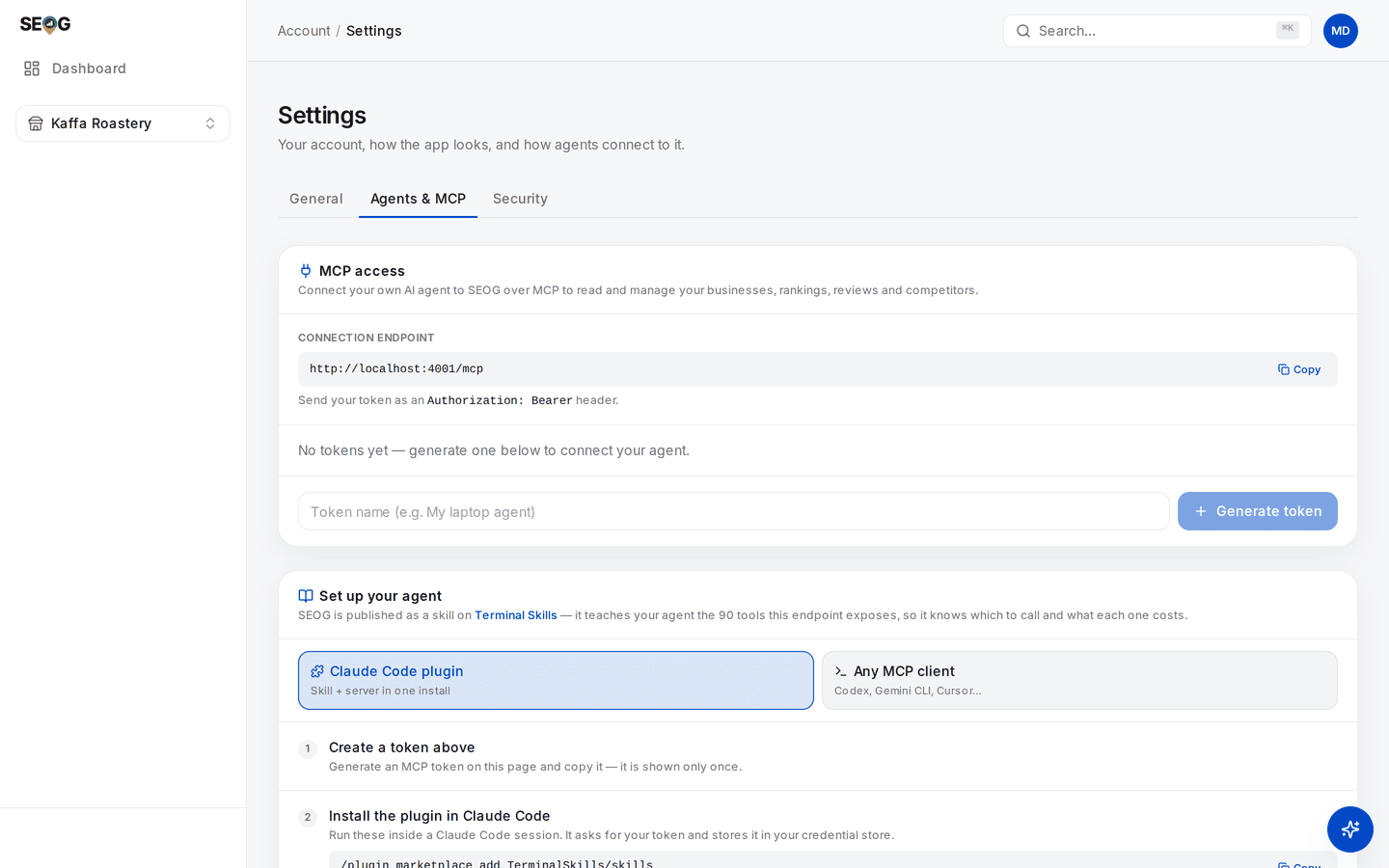
The whole surface on one screen. The endpoint at the top is what your client connects to; the token you generate below it is the only credential involved. Note the two setup paths — a Claude Code plugin, or the raw endpoint for any MCP client — and the line that matters most: the token is shown only once. The endpoint here reads localhost because the capture is from a local instance; yours will show the real host.
In Claude Code:
claude mcp add --transport http seog https://api.seog.ai/mcp \
  --header "Authorization: Bearer $SEOG_MCP_TOKEN"
For clients configured by file — Codex, Gemini CLI, Cursor — the same thing as JSON:
{
  "mcpServers": {
    "seog": {
      "type": "http",
      "url": "https://api.seog.ai/mcp",
      "headers": { "Authorization": "Bearer YOUR_TOKEN" }
    }
  }
}
List the tools before asking the agent to do anything. A connected server with zero tools is a different problem from a refused call.
Note · There is a second agent surface: an assistant inside the product that confirms actions in its own chat window. Different thing, different confirmation model. This chapter is about your agent, in your terminal.
What it can read, and what it can write
Five classes, and the boundaries between them are the design.
Costs follow one rule: anything that calls an external API — Google or a model — is paid; reading data you already hold is free.
That rule settles undo and delete too, and it settles them differently:
- Undoing a profile edit is paid — it replays the write against Google.
- Deleting a post or a photo is paid — it removes something from the live listing.
- Deleting a business, a keyword or a competitor is free — it only drops what SEOG stores, and touches Google not at all.
Which is worth knowing precisely, since the free ones are the irreversible ones.
| Class | What it touches | Cost | Examples |
|---|---|---|---|
| Stored reads | Data already in your account | free | list_businesses, list_keywords, review_stats, get_action_plan, get_latest_grid_scan, compare_competitors |
| Local writes | Your own bookkeeping, invisible to Google | free | update_business, toggle_keyword, set_recommendation_status, draft_review_response (stores text you supply) |
| Fetches | A live call to Google or a model | paid | check_keyword, refresh_rankings, sync_reviews, run_grid_scan, draft_post_content, generate_review_reply, check_citations |
| Public writes | The live Google listing | paid | apply_profile_fix, apply_business_description, publish_review_reply, publish_post |
| Irreversible | Deletes stored history or public content | either | delete_business, delete_post, delete_profile_photo, remove_keyword, remove_competitor |
Three consequences to internalise before you let one loose
The free/paid boundary is a budget boundary. list_keywords returns the positions from the last check; check_keyword goes and asks Google again. An agent that does not grasp the difference re-fetches data it already holds — the most expensive beginner mistake in Diagnosing a business in thirty minutes, now in a loop.
Two free tools exist so it can budget: one returns the balance and plan, one the live price of every charged action. Make it call both before any multi-business sweep.
Bundles beat loops. refresh_rankings re-checks every active keyword in one charged run; check_keyword per keyword costs more for the same answer. Same for refresh_competitors and refresh_website_all. A model left alone writes the loop.
Two things stay in the browser, for transport reasons rather than policy: photo upload needs the file bytes, connecting Google or Search Console needs a consent screen. An agent can list and delete profile photos and read connection status; it cannot upload an image or complete OAuth.