What the work costs
You can do the work now. Whether it is a business depends on three numbers: what the data costs, what your time costs, and what someone will pay.
Most people entering this trade get the order of those wrong. They assume the data is the expensive part, because it is the part that arrives as an invoice from a technology company. It is not.
Getting the order right protects you from two mistakes at once: building an operation optimised against the smallest line on your P&L, and quoting a price anchored to a bill that is a rounding error.
Three cost lines, and only one is large
| Line | What it is | Order of magnitude, per managed client per month |
|---|---|---|
| Data | Live calls to Google and to model vendors | Small — the smallest of the three, by a wide margin |
| Labour | Your hours, or someone's | Hundreds of dollars |
| Fixed | Tooling, your own site, accounting, unbilled hours | Amortised across your whole book |
The API bill is not the cost of delivery; it is a rounding error on it — which is why pricing off it is a trap. People who lose money doing local SEO lose it on unpriced hours, on clients who leave before onboarding is repaid, and on producing a monthly report nobody reads.
This is the single most important thing in the chapter, and it has a consequence people miss.
Optimising your data costs is optimising the wrong line. Halving a rounding error changes nothing. Halving the hours it takes to produce a monthly deliverable changes the business.
What the data costs, in shape rather than in dollars
The rate card moves. Google publishes current per-request prices for the place data underneath every local SEO tool, and those prices move — the platform was restructured in March 2025 and the rate card has been revised since.
Any table printed here would be stale before it was useful, so this manual does not print one. Read it at source: Google Maps Platform pricing.
What is stable is the shape, and the shape is what you need in order to reason:
- You are billed per request, by what you ask for. A request is priced at the tier of the most expensive field in it, so two calls that look identical can cost very differently (what the Places API will and will not give you).
- The owner-side half is a different economic animal. Business Profile, Search Console and PageSpeed are not billed the way place search is, so the richest data in local SEO — performance, full review history, the search terms people actually used — does not scale in cost with how often you look at it. It scales with whether the client connected their profile.
- Cadence is a bigger lever than efficiency. Map-pack positions drift over weeks. Scanning daily costs several times more than scanning fortnightly and tells you less, because the extra runs mostly measure your own noise floor (did it work?).
- Model calls follow the same logic. A monthly AI-visibility panel is a few dozen prompts, not a few thousand; the vendor's rate matters far less than how many times you decide to ask.
If you are costing a build or comparing vendors, take those four properties, put today's published rates against your own expected call volumes, and you will get a real number. It will be specific to your volumes and to this month, which is exactly why it belongs in your spreadsheet and not in a book.
You cannot amortise the data
The obvious next thought — buy once, sell to many, accumulate a local dataset that becomes an asset — is closed to you by contract, not by cost. Google's Maps Platform terms restrict caching and storage of place content, with a narrow exception and a hard time limit; owner-side content carries its own retention cap.
The verbatim clauses, with section numbers and dates, are in storing Google data legally — read it before designing any storage layer. (Our compliance material is a reading of published terms, not legal advice.)
So there is no data moat in local SEO. You cannot accumulate one, you cannot resell one, and anyone offering you a proprietary local dataset is describing something they are not permitted to hold.
What you can hold is your own dated measurement history — the scans, the positions, what you changed and when — an asset precisely because it cannot be bought.
Labour is the business
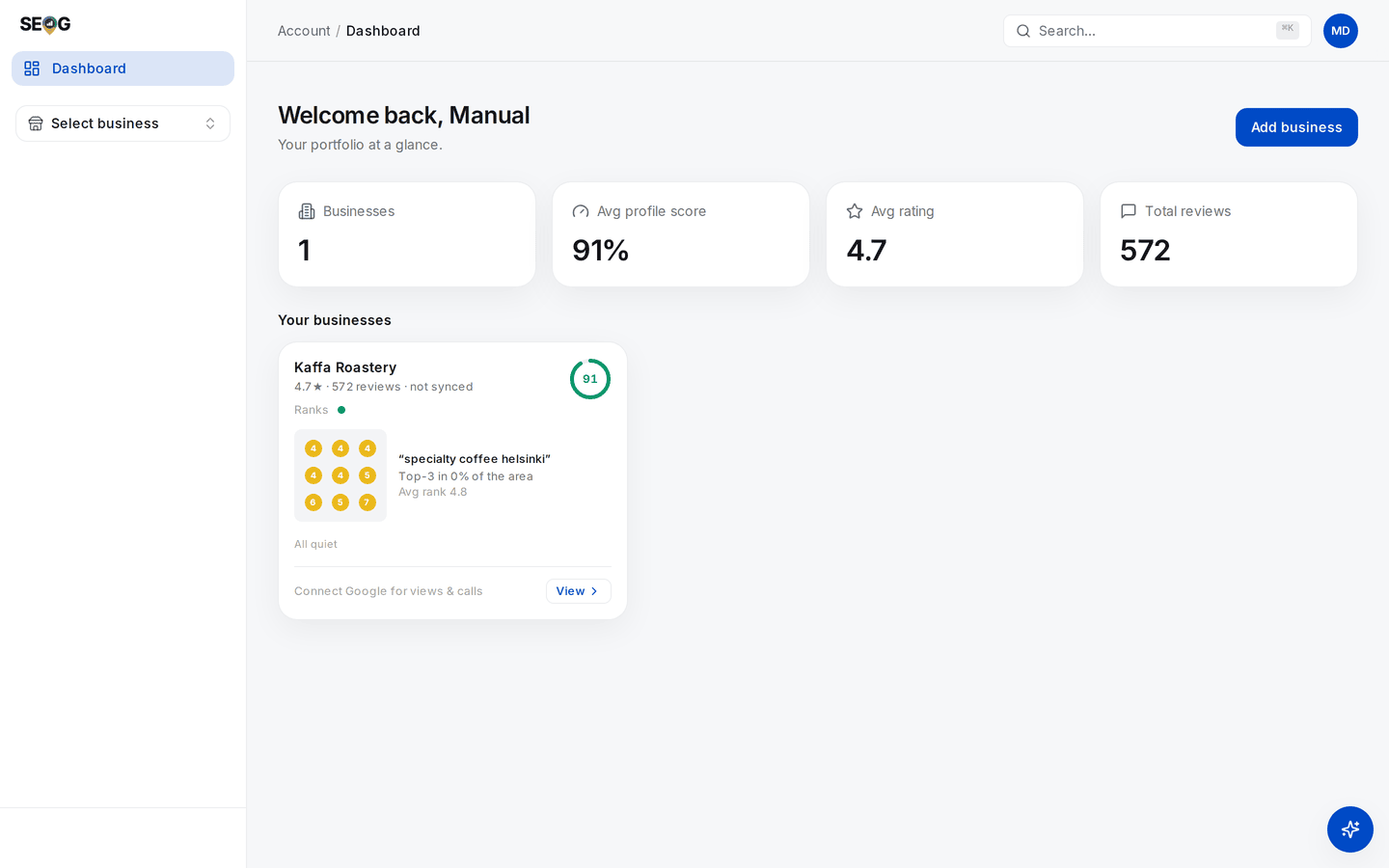
This is what a book of clients looks like from above, and it is the right picture to hold while reading the numbers below. The tiles and the mini-grid cost you nothing to look at — they are stored readings. What costs is the sentence a human has to write underneath each card once a month, and the phone call that follows it.
The hours below are an example, built from this manual's own lab times — honest for someone who has done each thing a few times. Your first month will be slower; measure your own in Lab 30.2.
| Phase | Work | Example hours |
|---|---|---|
| Onboarding, one-off | Access and connection, diagnostic, baseline freeze, keyword set, competitor set, citation pass, site audit, first fixes | 6–8 |
| Monthly, recurring | Re-scan and read, reviews and replies, a post or two, competitor read, report, client conversation | 2.5–4 |
| Occasional | A suspension, a merge, a migration, a review crisis | Unbudgeted, and it will happen |
Put an example rate on it — $60 an hour; use your own. Onboarding is roughly $400 of your time, a steady month $150–240.
Against those, a managed client's data bill is a small fraction of delivery cost — the exact share is one you compute in Lab 30.1 from your own volumes and today's rates, not one you take from here. Cost-plus pricing on the data bill is therefore not conservative; it is arithmetic that prices your month at nothing.
Onboarding is also front-loaded and unrecovered — a client who leaves at month three cost you more than they paid, which is what a minimum term is for.
And the "occasional" row is not padding: what you inherit with a client and suspensions and reinstatement exist because those events land on somebody's calendar without warning.
What automation actually removes
Most of the monthly cycle is mechanical, and an agent can take the fetch-read-assemble spine of it (running local SEO with an AI agent) — perhaps half the recurring hours. What it does not remove, and you should price accordingly:
-
The judgement calls. Whether a movement is real or noise. Whether to fight a suspension or rebuild. Which of thirty defects to do first.
-
The client conversation. Nobody renews a retainer because the PDF arrived on time.
-
Anything written to Google in the client's name. Reply text a human signs, photos a human took, posts a human approved. Both of the obvious shortcuts are closed by policy, not by taste.
Google's Business Profile APIs policies forbid automating review replies "without the user's prior specific and express consent"; Google's business-photo guidance says a photo "should be in focus, well lit, and have no significant alterations or excessive use of filters or AI. In other words, the image should represent reality" (Tips for business-specific photos on your Business Profile, retrieved 2026-07-27).
Those are constraints on your architecture (reviews, photos and the visual profile), not efficiencies waiting to be captured.
So the agent is a labour lever, not a data one: more clients per hour, same judgement per client.
How the work gets sold
Four shapes, and they price your risk as much as your work.
| Shape | What the client buys | Where the risk sits |
|---|---|---|
| Monthly retainer, per location | The ongoing cycle | Yours, if onboarding is heavy and the term is short |
| Fixed-price project | An audit, a fix sprint, a reinstatement, a cleanup | Yours, if the scope was written loosely |
| Per deliverable | A grid scan, an AI-visibility report, a citation pass | Low risk, low margin, no compounding relationship |
| Software resale or white-label | Tooling with your name on it | Yours: support and churn arrive without a matching hour |
This manual will not quote you an average retainer. Published pricing surveys are self-selected samples with undisclosed methodology, and repeating one hands you a number you cannot defend when a client pushes back. Build your own price book — Lab 30.3 — from prices you can point at.