Profile editing labs and common mistakes
The labs below run that five-step loop three times, on fields of rising consequence: first read what Google will and will not let you change, then publish a description and verify it, then practise the undo on a field you do not mind changing.
Labs
Lab 9.1 — Read what Google will and will not let you change
Lab · Where: Profile (
/b/{businessId}/profile) · Cost: paid · Time: ~15 minYou need: Lab 0.3 (a business added) and Lab 0.4 (its Google Business Profile connected — the editing half of the page is gated on it).
- Open Profile. Read the Business profile card and the Profile optimization card under it. Note the score and the Needs work list — each row carries the points it is worth, so the list is already sorted by leverage.
- Scroll to Make changes and expand the yellow banner beginning "Applying an edit through SEOG is not just a form save". Read all five consequences.
- Count the editable fields: business name, phone, website, opening hours, open status, description, service options, accessibility, payment methods, photos. Note what is not there — category, address and services. Those are edited in Google's own profile editor, and the manual is not going to pretend a button exists.
- Expand Business name. Note the Re-verification risk badge, the red panel and the checkbox you must tick before the editor appears. Do not tick it. Then expand Phone number and compare: one line of warning, no gate. That is the sensitivity taxonomy, in the interface.
- Expand Service options and press Choose options — this fetches the live attribute catalog Google publishes for your category. Do the same for Accessibility and Payment methods.
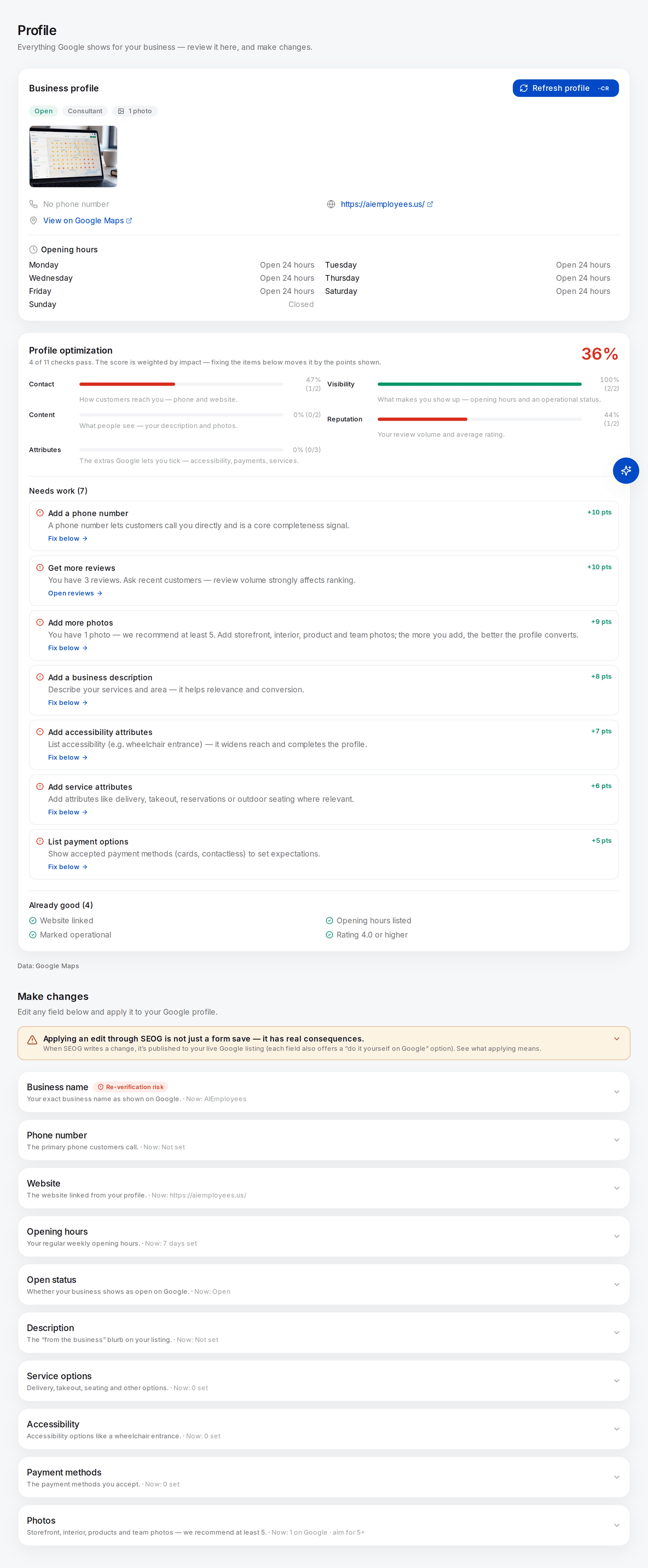
The whole lab on one page, on a profile scoring 36%. Two things to notice: each Needs work row carries the points it is worth, so the list is already sorted by leverage; and in Make changes, Business name is the only field wearing a Re-verification risk badge while Phone number wears none. Category, address and services are not in the list at all.
What good looks like. Three checklists whose contents differ and which you did not choose — Google's category catalog, not a SEOG list. Write down how many options each group offers.
If it went wrong. "Google offers no options of this kind for your business category" is a real answer, not a failure: the check is marked not applicable and stops counting against your score. If Make changes shows a connect card instead of fields, the profile is not connected as owner — do Lab 0.4 first.
Observe-only path. No owner access? Read the attribute chips on the listing in Google Maps, then read a business in a different category. The catalogs differ. Same finding, no connection.
What you just learned. What you are allowed to say about a business is decided by its category. Category is not one field among many; it determines which other fields exist.
Lab 9.2 — Write a description and verify it published
Lab · Where: Profile → Description (
/b/{businessId}/profile) · Cost: paid · Time: ~20 min, plus a ten-minute waitYou need: Lab 9.1.
- Expand Description and copy whatever is under Currently on Google into a scratch file. If it says "Not set", write that down — it is still your baseline.
- Choose a path: Write it myself opens the editor free; Write it for me drafts one with a model first, which is paid. Either way you edit the text yourself before it goes anywhere.
- Write until you have plain sentences naming what you do, where, and for whom. Watch the counter — 750 characters is Google's cap. Do not stuff keywords: this field converts humans and feeds assistants, and neither rewards a list.
- Apply it. Apply for me writes it to the live profile. Or press Copy, open your Business Profile on Google and paste it into About yourself — same result, no charge, three more minutes.
- Go to Overview. A notice should read N profile edits applied since your last refresh.
- Wait ten minutes, then press Refresh business info on that notice — a paid re-pull from Google — and return to Profile.
- Read Currently on Google again: your text, or the old value.
What good looks like. Your text read back from Google after a refresh, and the pending-edits notice gone. That round trip — write, wait, re-read from the source — is the only proof an edit published.
If it went wrong. If the old value came back, Google rejected the edit; the usual causes are promotional language, a phone number or URL in the text, or claims Google cannot square with the rest of the profile. Rewrite plainly rather than resubmitting. If the field is blank after a refresh on an unconnected profile, you are reading the public feed, which does not carry the owner's description at all.
What you just learned. "Applied" means accepted for review, not published. Skipping the verification step is how fixes get reported to clients that never went live.
Lab 9.3 — Practise the undo before you need it
Lab · Where: Profile (
/b/{businessId}/profile) · Cost: paid · Time: ~10 minYou need: Lab 9.2.
- Pick the Website field — ordinary, publicly visible, trivially reversible. Copy the current URL into your scratch file.
- Expand it, stay on the Apply with SEOG tab, change the URL to another page on the same site (services, contact), and press Save to Google.
- The panel turns green: Applied — Google usually reviews edits for ~10 minutes before they show publicly, with an Undo button beside it.
- Press Undo. It replays the write with the previous value, so it is a real edit against Google and is priced like one.
- Reload and read Currently on Google. Then wait ten minutes, run Refresh business info from the overview, and read it once more.
What good looks like. The original URL is back, confirmed by a refresh rather than by the local copy. You have done a full write–revert cycle on a live listing and know where the button is.
If it went wrong. Two real traps.
Undo is a write, not a rollback — it spends your ten-per-minute budget and goes through the same review, so an undo can itself sit pending.
The undo baseline is only as good as what was recorded. Undoing your first Opening hours edit clears the hours rather than restoring the previous ones, because the earlier value cannot be reconstructed from the public copy. Record hours by hand before you touch them. That is a genuine limitation of the tool, not a step you missed.
A gap worth naming. The description has no one-click undo in the editor. You revert it by re-applying the text you saved in Lab 9.2 step 1 — the entire reason step 1 exists.
What you just learned. Undo in local SEO is not Ctrl+Z. It is another edit, with the same review, budget and delay. The reliable undo is the value you wrote down before you started.
Without SEOG. Every edit here is available in Google's own profile editor at business.google.com, and for a single location that is a perfectly reasonable way to work — each field card carries a Do it myself on Google tab with the exact click path. What you lose is the record: no log of what changed and when, no undo baseline, no way to answer "what did we change in March" three months later. Doing it without SEOG has the full comparison.
Common mistakes
Editing the category to "test" it. Category is a critical field, and the test can cost days of visibility. Read the pack's categories first (Lab 3.3) — free, and it answers the same question.
Batching a profile overhaul into one session. Ten fields changed in an afternoon, then the listing goes pending: nothing is attributable and nothing is cleanly revertible. Sequence ordinary edits first, verify them, then do critical ones one at a time — The first ninety days lays out the order.
Trusting "Applied" as "published". The tool is reporting that the write was accepted. Google reviews it afterwards, silently, and a rejection just leaves the old value in place.
Auditing a competitor's description from a tool. What you are reading is Google's own editorial summary, written by Google's writers and not editable by the owner — not their copy. Open the listing in Maps and read "From the business" if you want the real thing.
Check yourself
Answer these against your own business, in writing.
- Which of your profile fields could take your listing off Google if you edited it today, and how sure are you? (Name, primary category, address — the industry's consistent list, not a Google-published one, so treat it as a working assumption and say so when you brief a client. Everything else in the editor is an ordinary edit, usually live in about ten minutes.)
- Your attribute picker shows nothing under Accessibility. What does that mean, and what should you do? (Your category's catalog offers no attributes in that group. Nothing — the check is not applicable and should stop counting against your score. Any audit demanding you add one is wrong.)
- You applied a new phone number an hour ago and it still shows the old one. Which two explanations, and how do you separate them? (Still in review, or rejected. Re-pull from Google: if the old value persists well past the review window, it was rejected.)
- Why can a bulk hours update break a scheduled post — and how confident should you be that it will? (On the conservative reading both spend the same ten-writes-per-minute per-profile budget, so hours across a week plus a post in the same minute exceed it and the post is what fails. Confidence: the ten-per-minute cap is documented by Google; the sharing of it across posts and photos is not, and stays an open question. Pace bulk work as though it is true.)
- You want a competitor's own description. Where do you look, and where do you not? (Their listing in Maps, "From the business". Not a tool's description field — that carries Google's editorial summary, not the owner's text.)