Turning failing checks into a plan
Both rubrics are now decomposed into named checks. Before that list becomes a plan, one distinction decides whether the diagnostic is honest — and then two more decide the order you work in.
Missing, or invisible?
This is where most first-pass audits quietly lie, and it is what separates a diagnostic from a checklist. Every field has three possible states, not two: present, absent, or not observable from where you are standing.
The public record Google exposes to search is a subset of what the owner sees, so on an unconnected business several checks report on data that was never visible to you. Three mislead constantly.
The description. The public place record does not carry the owner-written description; it is readable only through the owner connection. On an unconnected business a failing description check means unknown, not missing — and telling a prospect they have no description when they wrote one last year is an expensive way to lose the room. There is a second trap in the same field, covered where it belongs in The profile is the product.
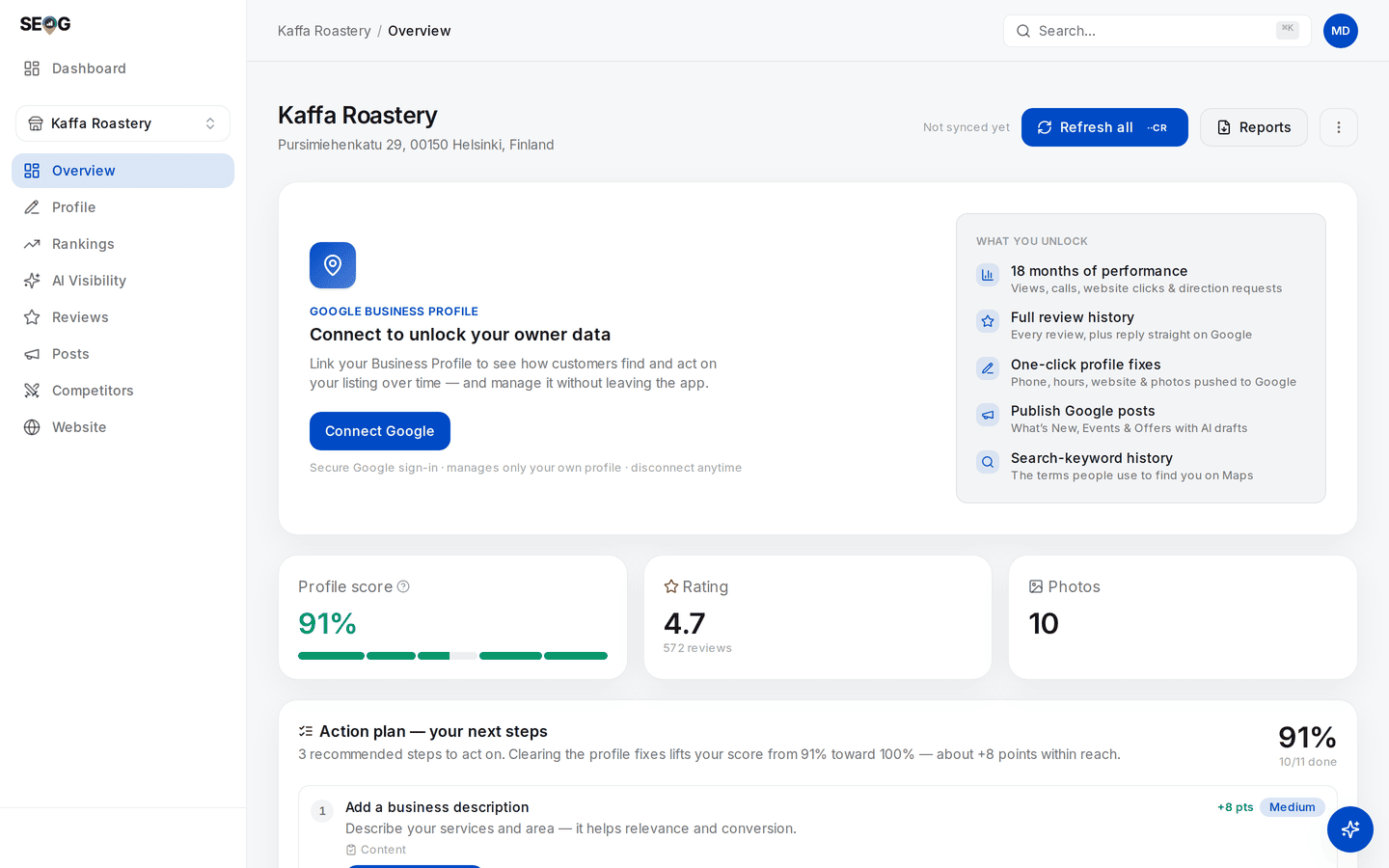
A healthy profile, observed from outside. Step 1 of the plan is "Add a business description" — but this business is not connected, and the public record never carries the owner-written one. That row is the trap: read it as unknown, and note that the connect panel above it is precisely the list of things you cannot currently see.
Review engagement. The readiness rubric divides the replies it has stored by Google's authoritative total review count. Without owner access you hold only a small recent sample of reviews, so that ratio is near zero by construction and measures nothing.
The response-rate ring on the overview's Review momentum card uses a different denominator — replies over reviews stored — so the two can disagree sharply on the same business. Why two tools disagree generalises the point.
Owner performance. Views, calls, direction requests and the search terms people used are owner-only. An empty performance panel means "not connected", not "no traffic".
So: when you cannot see something, write unknown, never "missing". A diagnostic that distinguishes the two is worth paying for; one that does not is a template with a business name pasted in.
Observe-only readers. All three labs in this chapter work on a business you do not own — none of them writes anything to Google. Your verdict simply carries more
unknownrows, and writing them honestly is the exercise. The public-versus-owner split is tabulated in Set up your workbench.
The order of work
Sorting by weight is the default the app gives you. The action plan merges four sources — the failing audit checks, the two readiness factors the audit does not already cover (fresh reviews and review engagement), and any stored website and listings fixes — then tiers them by impact and orders by recoverable points inside each tier.
Only the audit rows carry points, because only they move the profile score. Take that order as a first draft, because weight is not the only axis.
Effort. Adding opening hours takes ninety seconds and recovers 10 of 86. Getting from 12 reviews to 20 takes a quarter and recovers the same 10. Identical on the scoreboard, nothing alike as work. Sort by weight per unit of effort and the real first day falls out: the fields that are simply absent.
Latency. Some fixes are visible the moment Google publishes them. Others cannot move for months, being aggregates of customer behaviour you influence but cannot set. Splitting the list this way turns a diagnostic into a plan:
| Horizon | Work | Why |
|---|---|---|
| Today | Hours, phone, website link, attributes, description, photos | Fields you write directly |
| Weeks | Review inflow restarts, replies caught up, first posts | You act, customers respond |
| A quarter | Review volume threshold, rating movement, citation consistency | Aggregates that move slowly by construction |
Start the slow things first and do the fast things while they run. That inversion — begin the quarter-long work on day one, not after the quick wins — is the scheduling decision that most changes how a ninety-day engagement ends. The ninety-day plan turns it into a calendar.
One caution: the list is generated from the profile, so it cannot contain the finding that matters most for some businesses — a hard market, or a location too far from where their customers search. That comes from a rank map, and choosing what to track is where that half begins.
What can have moved, and what cannot
Reading stored data is free; fetching new data from Google is not — the economics are in how the labs work. Each domain on the overview has its own refresh button and its own price — Refresh all, Refresh rankings, Refresh map, Refresh reviews, Refresh competitors, Refresh check — separate on purpose, so you pay for the domain you asked about.
Refresh all re-pulls the profile fields and the reviews, plus the owner performance series on a connected business. It does not re-check keyword positions, re-run a grid scan, or re-fetch competitors.
So if a position on Rankings at a glance looks different afterwards, it did not change — you are misremembering, or reading a scan from another date. Every card that shows fetched data stamps it with the date it was fetched.
Read the stamp before the number, every time.
Freeze the baseline
You cannot see movement you did not record, and you will not remember what the numbers were. Two mechanisms do the recording, and you need both.
The automatic one. At most one metrics snapshot is written per business per calendar day — profile score, rating, review count, photo count, open fixes. That feeds Profile score over time, which is why the chart does not appear until a second snapshot exists. On day one there is nothing to draw, and a tool that drew a line anyway would be inventing one.
The deliberate one. A generated PDF is the human-readable freeze: generation date and last-synced date, key metrics, the profile fields as they stand, every audit check with its pass/fail and remedy, the nine readiness factors, and the merged plan. Generate it before you change anything, name it with the date, and never overwrite it.
By hand this takes about an hour: the profile dashboard for the fields, a spreadsheet for the twenty checks and factors, a dated copy somewhere safe. Doing it without SEOG has the long form.