Surface labs and common mistakes
These three labs are the practical half of the chapter. They make the six surfaces, and the limits of any single measurement, visible on your own practice business.
Labs
Lab 1.1 — Surface census
Lab · Where: your own browser (no SEOG) · Cost: free · Time: ~15 min
You need: a practice business chosen in Set up your workbench.
- Pick one keyword a customer would actually type. A service plus nothing else:
emergency plumber,thai restaurant,family dentist. Not the business name. - Open a private/incognito window on a desktop browser. Search the keyword plus the city.
- Working down from the top of the page, list every block you hit in order until you reach the first ordinary blue link. Ads count as blocks — label them.
- Repeat without the city name in the query.
- Now do both on your phone, on mobile data rather than the shop's Wi-Fi, ideally standing at or near the business.
- Screenshot all four. Fill in one row per run: surfaces seen, in order.
What good looks like. Four rows, and at least one real difference between desktop and mobile — commonly the pack sitting lower, an AI block appearing on one and not the other, or more ads on mobile. If your four rows are identical, your query is probably too transactional to trigger a generated answer, which is itself a finding worth writing down.
If it went wrong. You searched the business name — that is a branded query and returns a knowledge panel, not a competitive pack; use the service term. You are signed in and seeing personalised results — use a private window. You are on a VPN — your results belong to whatever city the exit node is in.
What you just learned. A search result page is not a list, it is a stack of independently-selected blocks, and the query decides which blocks exist. A rank without a surface, a query and a location attached to it is not a measurement.
Lab 1.2 — Read your baseline without touching anything
Lab · Where: Overview (
/b/{businessId}/overview) · Cost: free · Time: ~10 minYou need: your practice business added (Lab 0.3).
- Open the business overview. Do not press any refresh button — Refresh all, Refresh rankings, Refresh competitors, Refresh map, Refresh reviews and Refresh check each fetch live data from Google and are priced. Everything in this lab is already stored.
- Read the three cards along the top: Profile score, Rating (with its review count), Photos.
- Hover the question mark on Profile score. The bar under it is split into five areas — Contact, Visibility, Content, Reputation, Attributes — and the width of each segment is its weight while the fill is your coverage. Note which segments are visibly unfilled.
- Read Action plan — your next steps below it. Do not act on anything yet.
- Scroll through Rankings at a glance, Local visibility, Vs local market, Review momentum and Website support. On a new business several of these show a clearly-labelled Example preview instead of your data. Write down which ones — that list is your to-do list, not a fault.
- Write six lines in a note you will keep: today's date, profile score, rating, review count, photo count, number of tracked keywords (zero is a perfectly good answer).
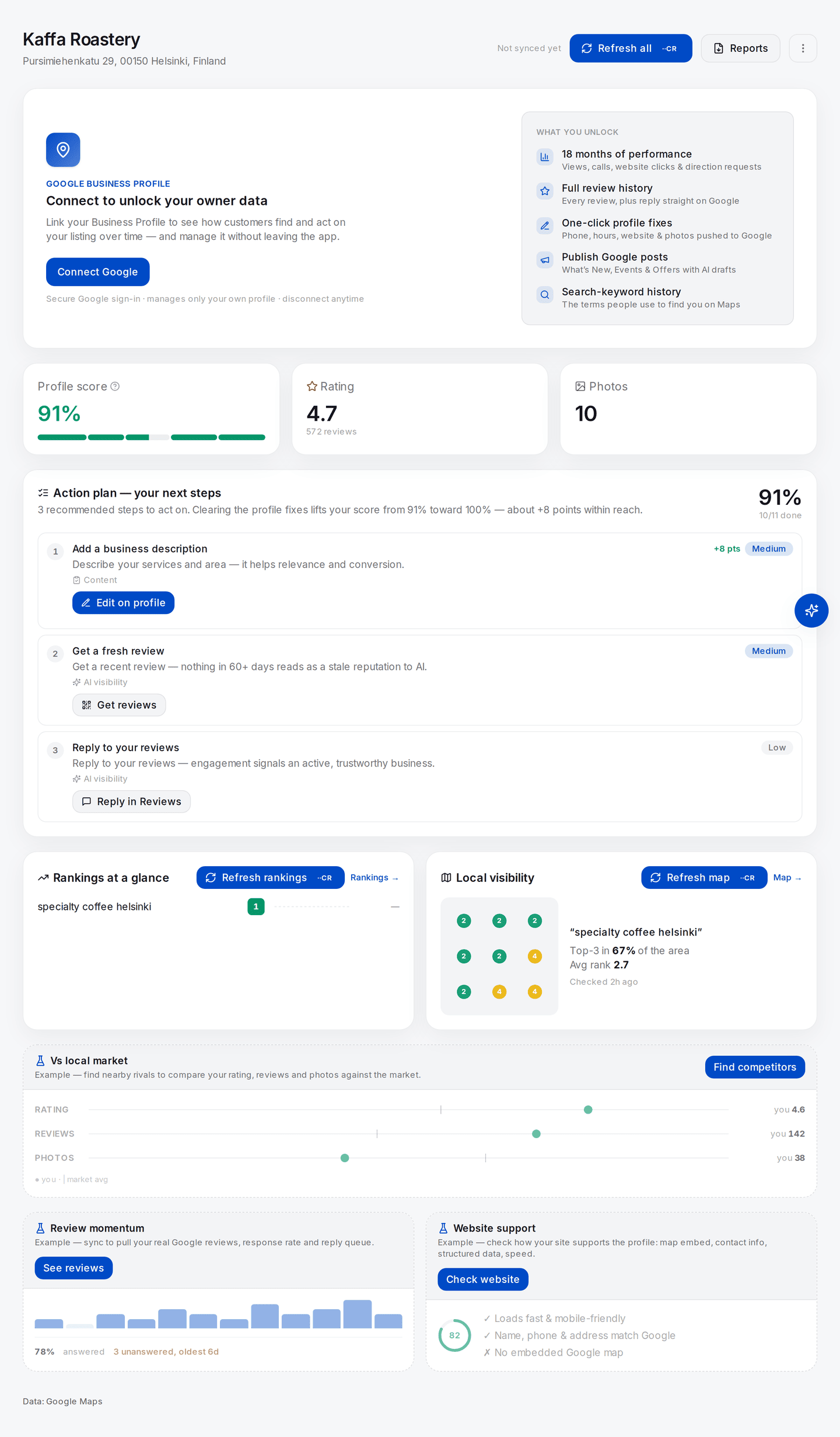
This is step 5 on one screen. The three cards at the top are real data imported from Google — 91%, 4.7 from 572 reviews, 10 photos. Everything from "Rankings at a glance" downwards is prefixed Example: those keyword positions, grid squares and competitor bars are placeholders showing what the panel will look like once you run it, not measurements of this business. Learning to spot that label is the point of the lab.
What good looks like. A dated six-line note, and the ability to say which cards were showing your data and which were showing an example.
If it went wrong. The score looks unfairly low: the audit scores completeness of what is publicly visible, and several fields are invisible without the owner connection — see the public-versus-owner table in Set up your workbench. Performance shows nothing at all: that panel is owner-only and stays empty until the Google Business Profile is connected.
What you just learned. You never change a profile you have not measured, because you will not be able to prove anything afterwards. And reading stored data costs nothing — a habit worth forming now, because most questions beginners try to answer with a fresh fetch are answerable from data they already have.
Lab 1.3 — The two-machine test
Lab · Where: your browser and any one AI assistant · Cost: free · Time: ~10 min
You need: the keyword from Lab 1.1.
- Rewrite that keyword as a person would ask another person: "who's the best emergency plumber near Shoreditch?" — your own neighbourhood, not mine. Never name your own business in the prompt — a named business begs the answer.
- Ask one assistant: ChatGPT, Gemini, Perplexity or Claude, whichever you have.
- Write down every business it names, in order, and every source it cites.
- Put the same question into Google. Write down the businesses in the map pack, in order.
- Count how many names appear in both lists.
- Open a fresh chat and ask the assistant the identical question again. Compare with your first answer.
What good looks like. Two lists that overlap partially, often by one name or none — and two runs of the same assistant that also fail to fully agree. Both are the expected result, not an error.
If it went wrong. The assistant refused, answered generically, or told you to check Yelp — record that as a result, because how often an engine punts is real data; the AI visibility method explains why those answers must leave the denominator rather than count as a miss. If the two runs agreed perfectly, run it twice more; a single pair proves nothing either way.
What you just learned. The machines are grounded in different data, so winning one predicts little about the others. And one answer is a sample, not a measurement — which is why every serious claim about AI visibility in this manual is a rate over runs.
Common mistakes
Saying "we rank #3" and stopping there. Rank without a surface, a query, a coordinate and a date is not information. It is the most common way a local SEO report lies without anyone lying.
Assuming the AI surfaces follow the pack. They share inputs and disagree on outputs. Optimising only for the pack and reporting AI visibility as "coming along" is an unbacked claim, and the published brand overlap is a coin flip.
Treating one AI screenshot as evidence. Screenshots of an assistant naming your client circulate in sales decks. Run the same prompt twice and you will usually get a different list; the screenshot was a sample of one.
Checking your own rank on your own phone at your own desk. Signed in, personalised, and standing at the one location where you look best. This feels like verification and is closer to the opposite.
Fixing before measuring. Tempting, because fixing feels productive and measuring feels like delay. It costs you the ability to demonstrate that anything worked, which is the whole basis of getting paid next month.
Check yourself
Answer these against your own practice business, not in the abstract.
- Which of the six surfaces did your keyword actually produce, and did that set change between desktop and mobile? If you cannot answer, Lab 1.1 is not done. If the set was identical on both, say why you think so.
- Your business is not in the map pack for your main keyword. Name three different explanations, each of which would demand a different fix. (For example: it ranks 7th and is fine in the local finder; the searcher's location is outside your effective radius; it is a service-area business that public search cannot see at all — see service-area businesses.)
- An assistant recommends five businesses and yours is not among them. What is the smallest amount of work that would tell you whether that is a real absence or noise? (Re-run it. Several times. Then compare rates, not answers.)
- Which cards on your overview were showing example data rather than yours, and what would each one need to become real?
- A client asks "are we ranking well?" What do you need to know before that question is answerable? At minimum: which surface, for which query, measured from where.