Entity labs and common mistakes
These three labs take the entity model apart on your own practice business: what the record holds, what stays fixed while everything else moves, and where the world's copies of it disagree.
Labs
Lab 2.1 — Inventory the entity
Lab · Where: Overview (
/b/{businessId}/overview) and Profile (/b/{businessId}/profile) · Cost: free · Time: ~15 minYou need: Lab 0.3 done (a business added). Lab 0.4 (the Google connection) makes this much richer, but the lab works without it.
- Open Overview. Working top to bottom, write down every distinct fact on the page: the Profile score, Rating and Photos cards, then Action plan — your next steps, Rankings at a glance, Local visibility, Vs local market, Review momentum, Website support and Performance.
- Open Profile. The Business profile card holds the raw fields: status, category, price level, photo count, gallery, phone, website, the Google Maps link, a description blurb if Google has one, Opening hours and Attributes on Google.
- Mark each entry with one of three letters: P if it came from the public import, O if it appeared only after connecting Google, S if it is SEOG's own measurement rather than a field of the entity at all.
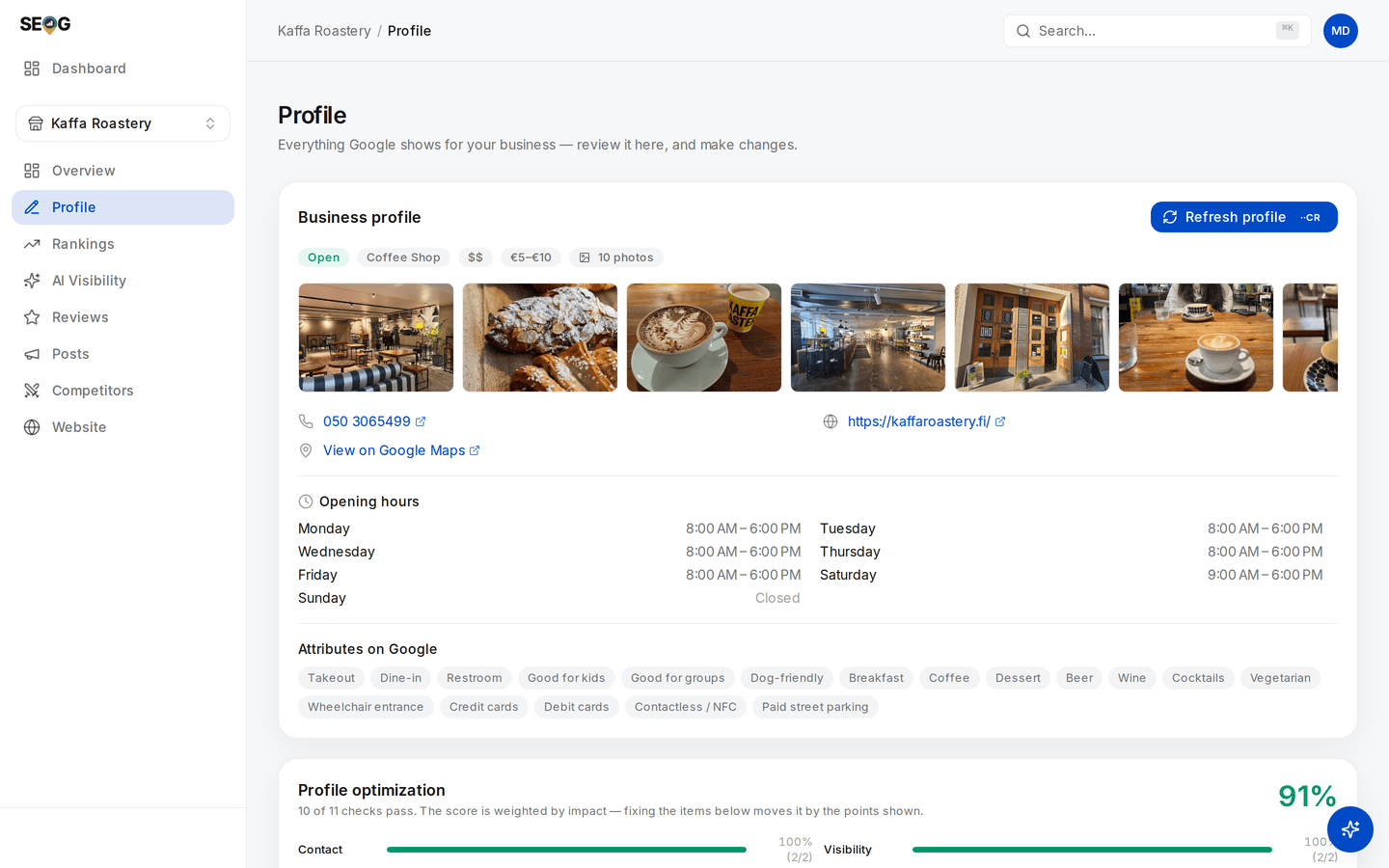
Step 2 on one card: status, category, price level, the photo gallery, phone, website, the Maps link, opening hours, attributes — the raw fields of the record, all of them P. Now notice what is absent. There is no description on this card, because the owner-written blurb does not come through the public read at all; on a connected business the owner's real description appears here, and it is marked O. If a blurb does show without a connection, read it carefully — that is Google's own machine-written summary of the place, not text anyone at the business wrote.
What good looks like. Most identity and contents fields are P. The description, the Performance panel, the search-terms card and the whole Make changes editor are O — without the Google connection the page shows the connect card in place of the editor. The profile score, rankings, grid and competitor comparison are S: nothing in Google's record contains them.
If it went wrong. A blank field is usually Google not exposing it rather than an error — a business with no description on Google has none here either. If Performance shows nothing at all, the Google connection is not live; that panel is owner-only by construction.
What you just learned. The difference between a field of the record and a measurement about the record. Sorting any tool's screens into those two buckets tells you what it knows versus what it estimates.
Lab 2.2 — Watch the identity hold still while the contents move
Lab · Where: Reviews (
/b/{businessId}/reviews) then Overview (/b/{businessId}/overview) · Cost: paid (the refresh re-fetches profile and reviews from Google) · Time: ~10 minYou need: Lab 2.1 done.
- Go to Reviews and click Request review. The modal shows a Review link — Google's public "write a review" URL for this business. Copy it. The long string after
placeid=is the entity's identifier. Paste it into your notes. - Go back to Overview and record four values exactly as they stand: rating, review count, photo count, and the Synced … stamp in the page header.
- Click Refresh all. Read the price on the button before you confirm it — that habit is worth forming now.
- When it finishes, record the same four values again. Then reopen Request review and compare the identifier to the one in your notes.
What good looks like. The Synced … stamp has reset to "just now". Some contents may have moved — a review arrived, the photo count changed, the rating shifted by a tenth. The identifier is character-for-character identical, and will still be next year.
If it went wrong. Nothing moving except the timestamp is a correct result, not a failed lab: a quiet business does not change between two refreshes an hour apart. If the modal says there is no place ID, the business came in through the owner connection and Google's public record has not been matched to it — common for service-area businesses.
What you just learned. Identity and contents change on completely different timescales, which is why they are stored, licensed and reasoned about differently. It is also the basis of longitudinal measurement: you can compare this month to last month because the key did not move underneath you.
Lab 2.3 — Two records, one shop
Lab · Where: Profile (
/b/{businessId}/profile) and the business's own website · Cost: free · Time: ~15 minYou need: Lab 2.1 done, and the business to have a website.
- On Profile, write down four things exactly as Google has them: the business name, the full address, the phone number, and the opening hours.
- Open the business's website. Find the same four things — check the footer, the contact page and any "locations" page. Write each one exactly as it appears, including punctuation and abbreviations.
- Line them up and mark every difference. "Street" against "St". A local number against a tracking number. Winter hours updated in one place only. A suite number present here, missing there.
- For each mismatch, decide which is true, and note where else that wrong value is likely repeated — an old directory listing, a Facebook page, a printed flyer.
What good looks like. A short list of concrete discrepancies with a decided winner for each. Most businesses have between one and four. Zero usually means you did not look at the footer.
If it went wrong. If you find nothing, check whether the site's contact details live inside an image or a map embed rather than as text — that is a mismatch of its own kind, because it is unreadable to everything that is not a human eye.
What you just learned. The entity is one record, but the world holds many copies of it and you control only some of them. Consistency work is not superstition about exact string matching; it is the job of making all the evidence about one business tell the same story. Citations and NAP consistency turns this list into a work queue.
Doing this without SEOG. All three labs work by hand: the public view is any business's Google Maps listing, the owner view is the Business Profile dashboard, and the identifier comes from Google's own Place ID finder. Nothing is recorded, though — you get today's values and no history. See Doing it without SEOG.
Common mistakes
Optimising the website and expecting the map pack to move. Tempting, because it is the part you control completely and the part your web team knows how to do. It costs months. Site work does support the entity — prominence draws on what the web says about a business — but it is indirect and no substitute for a profile with the right category and complete fields.
Treating a stored number as the current one. A rating you read this morning was fetched at some earlier point. Quoting it as "your rating today" without checking the timestamp is the most common way a competent practitioner says something untrue. Read the Synced … stamp first, every time.
Assuming there is only one record. People diagnose for weeks — bad categories, weak reviews, a slow site — when the real problem is a duplicate listing splitting the signals. Check for duplicates early; it costs nothing and it is a complete explanation when it is the answer.
Treating name, address and category as ordinary fields. In Google's own profile editor they sit beside the phone number and look equally editable. They are not: they are the identity, and changing them can send the listing back through verification. The profile is the product covers which fields are safe and which are not — and why, of the three, only the name can be edited from SEOG at all, behind an acknowledgement you have to tick.
Check yourself
Answer these against your own practice business, not in the abstract.
-
Your website goes offline for a month. What happens to your map-pack position? It does not vanish, because the entity is still there and still complete. Expect gradual erosion at most (inference): you removed one input to prominence, not the ranked object. If your answer was "we disappear", re-read the first section.
-
A tool shows a competitor's full review history for a business it has no owner access to. What is it actually showing you? Its own accumulated sampling, or an estimate. The public data surface returns at most five reviews, ordered by relevance; nobody gets a stranger's full history from it.
-
Your listing says you close at 6pm; your website says 7pm. Which does Google believe? Google shows the listing — that is the record it ranks. But the mismatch is itself a signal about how reliable your information is, and the customer who arrives at 6:15 does not care which system was wrong.
-
You find two listings for the same shop with reviews on both. Which is the "real" one? Neither, until Google merges or removes one. Both are real records splitting your reputation. This is a duplicate problem, not a ranking problem — solved through Google's duplicate handling, not by optimising either listing harder.