Working a review queue
The labs below run a real review queue end to end. They are the practical form of the two rules above: a human writes the reply, and the reply is not published until you have read it back.
Labs
Lab 11.1 — Sync, then find the reviews that need work
Lab · Where: Reviews (
/b/{businessId}/reviews) · Cost: paid (the sync), then free · Time: ~15 minYou need: Lab 0.3 — a business added. Owner access (Lab 0.4) gets full history; without it, the five-review sample — the lab works either way.
- Open Reviews and press Sync reviews. Watch the pill beside it: "Synced full history from Google" means the owner archive, "Synced N recent reviews" the public sample. Note which — it changes what every number below means.
- Read the five stat cards — Total, Needs response, Handled, Risky (1–2 star, or a safety concern), Avg rating — then Reputation insights: response rate, last review date, star distribution.
- Use the filters properly. Four orthogonal axes, not one list: a status tab (All / Unanswered / Answered / Drafts), a rating filter, a comment filter (All reviews / With comment / Rating only), and a sort. Run these three and note each count:
Unanswered+Low (1–2★)+Newest— the queue costing you money today.Unanswered+With comment— the ones a reply can be written for.All+Rating only— bare stars, nothing to answer. Know this before promising 100%.
- Every filter is in the URL, so the view is shareable. On an unanswered review, read the credibility badge — Credible, Questionable or Suspicious, reason on hover. A triage aid, not a verdict.
What good looks like. Three counts, a clear answer to "which review do I answer first", and a one-sentence diagnosis: volume, rating, recency or engagement.
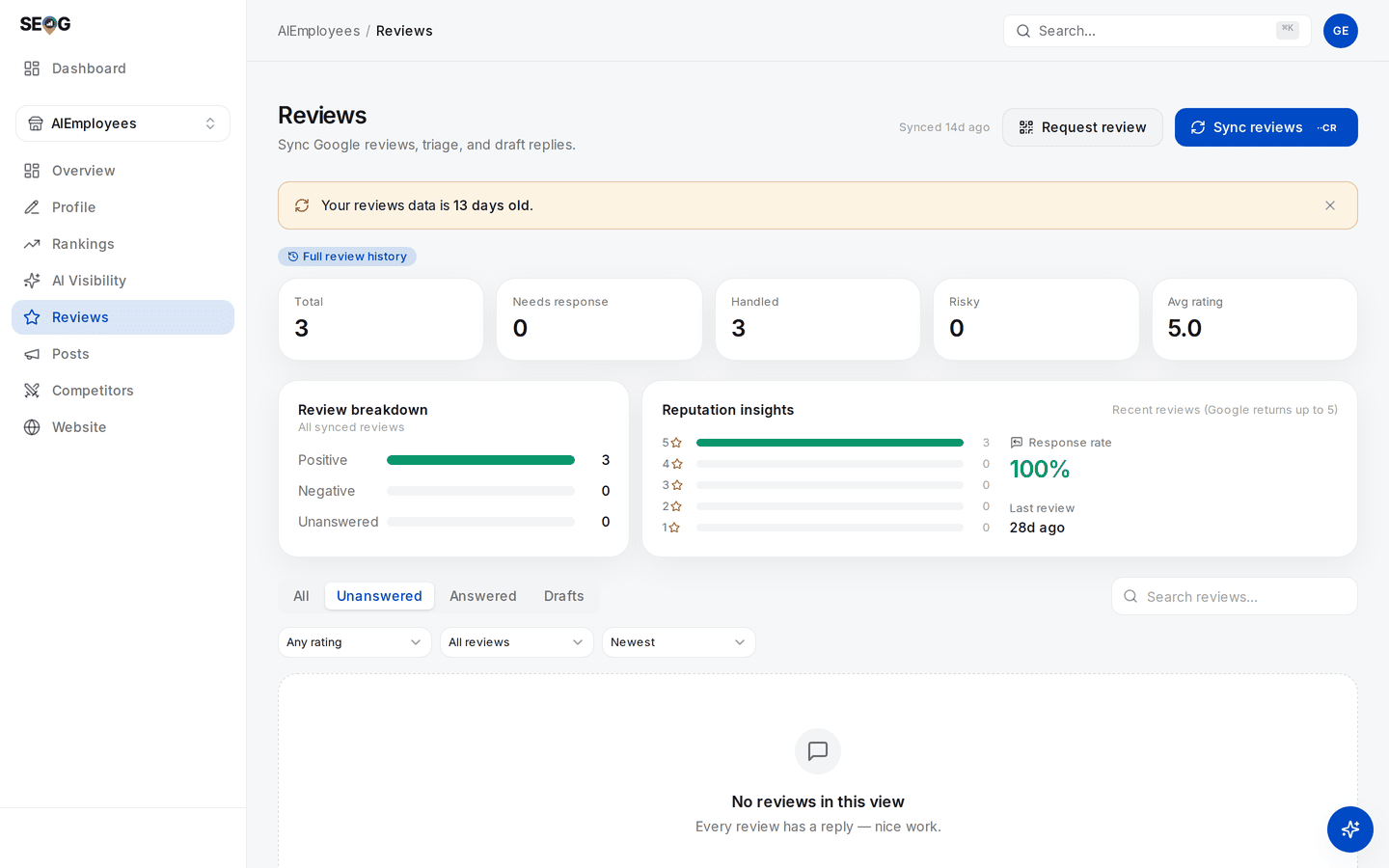
The same page with owner access. The pill above the stat cards marks the sync as full history rather than the five-review sample, so Total 3 is Google's own count — a real number, and a small one. Read it as the four dimensions: rating 5.0 and engagement 100% are fine, volume is the problem, and the amber banner says the whole picture is 13 days stale.
If it went wrong. Nothing synced: no Google place linked, or no reviews exist. Expected hundreds, got five: you are on the public sample.
What you just learned. "Unanswered" alone is not a work queue — it mixes silent 5-star ratings with this morning's complaint.
Lab 11.2 — Write and publish one reply by hand
Lab · Where: Reviews → an unanswered review → Respond (
/b/{businessId}/reviews) · Cost: paid · Time: ~10 minYou need: Lab 11.1, and owner access to publish. Without a connected profile the composer is draft-only and steps 1–4 still work.
- Pick a review with text, ideally a middling one (3–4 stars). Press Respond.
- The composer opens on Write it myself — the default on purpose. Draft with AI is the other tab, used in Lab 11.4.
- Write two to four sentences following the four rules above: name the specific thing, say what changed, no personal data, no arguing.
- Read it back as a stranger comparing three businesses. If it would fit under any review of any business, it is not finished.
- Tick the I understand this reply publishes publicly on Google gate — required, because editing later cannot un-say what was published — then press Publish to Google.
Observe-only alternative (no owner access): read three competitors' owner replies in Google Maps, classify each as specific, generic or defensive, then write the reply you would publish for their worst one.
What good looks like. The card shows your reply with Confirmed on Google and a timestamp. Confirmed is the operative word — Lab 11.3 explains why.
If it went wrong. Publishing needs a connected Business Profile — draft-only mode; Save draft and come back. Sync reviews first — the review came from the public sample, so it has no reply target. Or Google accepted the reply and it has not appeared: the read-back failing. Retry shortly.
What you just learned. Publishing to a live profile is a public act with a gate in front of it — and the manual path is not the slow path. Four minutes, most of it thinking.
Lab 11.3 — Prove the reply is actually on Google
Lab · Where: Reviews → a review carrying a published reply (
/b/{businessId}/reviews) · Cost: paid · Time: ~3 minYou need: Lab 11.2, or any review that already has a reply.
- Find a reply block showing Confirmed on Google or the unconfirmed warning. Replies published elsewhere — the Google dashboard, another tool, or before verification existed — show as unconfirmed. Not a bug; nobody ever checked.
- Press Re-check on Google, which reads the review back from Google now.
- Record what changed: a fresh confirmation timestamp, or one that has gone away. Re-check a reply published a month or more ago too.
What good looks like. A confirmation timestamp from today on a reply you can also see with your own eyes on the live profile. Check it in another tab — once. After that, trust the read-back.
If it went wrong. If the check cannot reach Google it reports an inconclusive result and no charge applies — never a verdict either way. If a previously-confirmed reply comes back unconfirmed, the reply or the review is gone: a finding, not an error.
What you just learned. This generalises past reviews: for any write to a system you do not control, the response is a receipt, not evidence. Evidence is reading the thing back and finding your own content.
Lab 11.4 — Compare a draft against what you would sign
Lab · Where: Reviews → a second unanswered review → Respond → Draft with AI (
/b/{businessId}/reviews) · Cost: paid · Time: ~10 minYou need: Lab 11.2, so you have your own hand-written reply to compare against.
- Open a different unanswered review, press Respond, switch to Draft with AI.
- Pick a tone — apologetic, professional, grateful or firm but polite. The default follows the rating: apologetic for 1–2 stars, grateful above.
- Press Generate with AI. The draft lands in the editor from Lab 11.2.
- Edit until you would put your own name on it. Delete every sentence that could appear under any review of any business.
- Count what survived. Under half the words means the draft was a prompt, not a reply — a perfectly good use of it.
- Publish it (paid, same gate as Lab 11.2) or Save draft for a colleague to approve.
What good looks like. A reply shorter and more specific than the draft, plus an honest opinion about whether generating it saved time. For a detailed complaint, usually not. For the twelfth "great service, thanks!", usually yes.
If it went wrong. A bland draft usually means a bare rating with no text, which gives a model nothing. Changing tone and pressing Regenerate is a new draft, charged again.
What you just learned. AI drafting is a keystroke saver on low-stakes replies and a liability on high-stakes ones — which is why it sits behind a tab, and why a human ships the text.
Without SEOG. All of this works in the Google Business Profile dashboard: reviews, replies, the "write a review" link. What you lose is the read-back — the dashboard shows your reply because it wrote it — plus chartable history and a filter crossing status with rating. Long version.
Common mistakes
Review gating dressed up as a survey. The "how did we do?" flow routing happy customers to Google and unhappy ones to a private form is the most common violation in the category, and it is sold as reputation management. It is the "selectively solicit positive reviews" clause verbatim, and easy to detect because the resulting distribution is impossible.
Running last year's playbook. Per-technician review targets and "ask them to mention you by name" were normal advice until April 2026. Enforcement removes reviews without warning.
Treating "posted" as "published". A reply Google accepted and never showed is invisible to everyone including you, and sits in your reporting as handled.
Optimising the star average instead of the flow. One new review barely moves an average past a hundred; recency and response rate move immediately.
Check yourself
Answer these against your own practice business, in writing.
- Which of the four dimensions is weakest — volume, rating, recency or engagement? A defensible answer names numbers: "31 reviews at 4.6, last one 74 days ago, replied to 20% — recency and engagement."
- A staff member asks whether they can tell customers to mention them by name. What do you say, and which clause? (No, since April 2026: "merchants requesting that staff solicit reviews that include specific content, including content that identifies a staff member." Unprompted is fine.)
- Your tool says the reply posted. Name two ways it could still not be on Google. (The profile is not in good standing; or it went under the wrong owning account.)
- You can see five reviews for a competitor. What can you conclude, and what can you not? (Tone and recurring complaints, not volume or trend — the sample is relevance-ranked, not random.)
- Why is an automatic reply to every new review a policy problem, not a productivity win? (Named as abusive behaviour without prior specific and express consent — and the merchant's account carries the consequence.)