Auditing and changing a gallery
The rest of this chapter is practice. Each lab runs against a real listing, and each one is built to make one of the limits above concrete rather than theoretical.
Labs
Lab 10.1 — Audit the gallery
Lab · Where: Profile (
/b/{businessId}/profile) · Cost: free · Time: ~10 minYou need: Lab 0.3 (a business added). Steps 4–6 need Lab 0.4 (Google Business Profile connected).
- Open Profile. The top card, Business profile, carries a pill reading
N photos. Write down N. Do not press Refresh profile — that is a paid live fetch and you do not need it yet. - Scroll the photo strip. Click one to open the lightbox and arrow through the set. Note the Google Maps attribution in the corner; that is not decoration, it is a condition of showing this data at all (storing Google data legally).
- If N is 10, write "at least 10, true count unknown" rather than "10". That is the ceiling from the previous section.
- Scroll to Make changes and open the Photos field, on the Apply with SEOG tab. The panel lists Current photos — the removable set, owner-managed media only.
- Compare the two lists by eye. Images in the public strip that are absent from Current photos are, in the main, not yours. Match on subject, not on file: the two lists are served as different renderings of the same photo, so crops and sizes differ.
- Record three numbers: shown publicly, removable, and the difference.
What good looks like. You can name, for this business, exactly how many of its public photos you have any power over. For a well-photographed local business with an active review base, the difference is usually larger than the owner expects.
If it went wrong. No Make changes section at all means the Google Business Profile is not connected — steps 1–3 still work and are the observe-only version of this lab. An empty Current photos with the note "No removable photos found. (Customer-contributed photos can't be removed via the API.)" is not a bug: it means every visible photo came from somebody else.
Observe-only alternative. Run steps 1–3 on your practice business, then open Competitors and read the comparison row for photos. Note how many of the numbers sit at exactly 10, and write one sentence explaining why that row is nearly useless at the top of the range.
What you just learned. A public photo count is a capped sample and a gallery has several authors. Both facts are invisible in every dashboard that reports "photos: 10" without a footnote.
Lab 10.2 — Upload photos you captured
Lab · Where: Profile → Photos field (
/b/{businessId}/profile?field=photos) · Cost: paid · Time: ~10 min plus shooting timeYou need: Lab 0.4 (Google Business Profile connected), and photos you took yourself. Skip if you are on the observe-only path — you must not write to a listing you do not manage.
- Take three photos on your phone: the storefront from the street, one interior, one of the product or workspace. Daylight, no filters, nothing borrowed.
- Convert to JPEG or PNG if your phone shoots HEIC, and check each is under 5 MB.
- Open Profile. If the audit card lists Add more photos under Needs work, use its Fix below link — it jumps straight to the right field. Otherwise open the Photos field yourself.
- Under Add photos, choose your files (up to ten per upload) and press Upload to Google. The price is shown on the button before you confirm.
- Watch the count on the Business profile card. Then re-read the audit: the At least 5 photos check flips to passed once the profile crosses five.
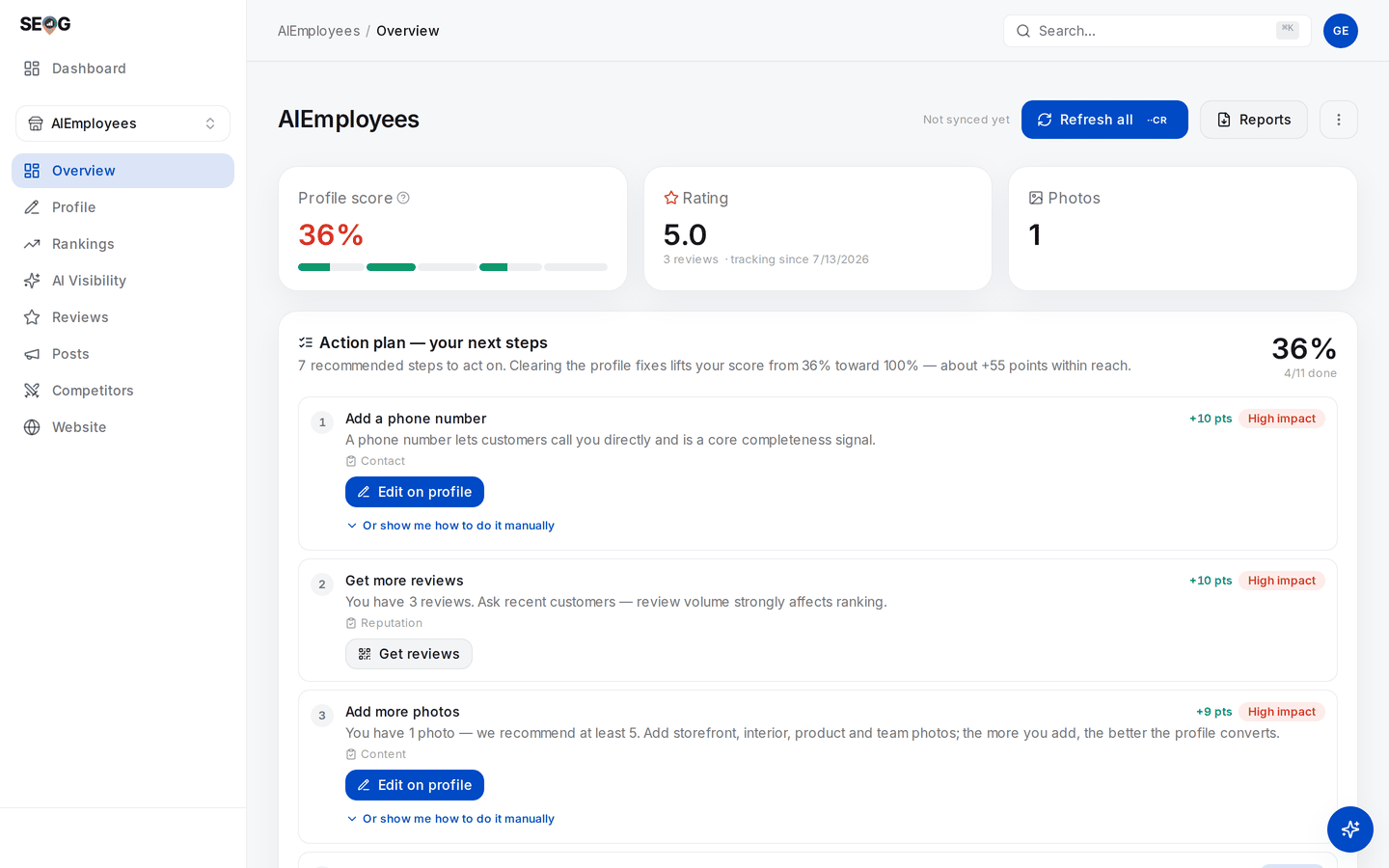
The photo check before the upload — one photo, and the fix is scored as the third-largest item on the plan. Those points are the completeness audit's own weighting, not a ranking claim: the score tracks whether the profile is filled in, and nothing else.
What good looks like. The photo count increases by exactly the number of images that succeeded, and the profile score moves if the photo check just passed. On Google's side the images appear after review — usually minutes.
If it went wrong. "Google rejected the photos — try different images" means nothing in the batch landed; the charge is refunded automatically when an action delivers nothing.
A partial result is normal and expected: uploads are attempted per image, so two can succeed while a third fails. Common causes are the wrong format, a file over the size limit, or an image too small. Note that you get no reason back per image — that is the API, not the tool.
What you just learned. An upload is a write to a live public record, not a file save. It queues behind Google's review, it consumes the same per-profile edit allowance as every other change, and the only evidence you will ever get about whether it worked is the count going up.
Lab 10.3 — Try to remove the wrong photo
Lab · Where: Profile → Photos field · Cost: paid · Time: ~5 min
You need: Lab 10.2. Best done on a photo you uploaded in that lab, so the removal costs you nothing you wanted to keep.
- First, find a photo in the public strip you would genuinely want gone — an old menu, a dark shot, a competitor's van in frame. Real businesses always have one.
- Look for that exact image in Current photos. If it is not there, you cannot remove it. Write down which image it was and stop trying.
- Now remove one of your own: hover a photo in Current photos, press the remove (bin) icon, and confirm on the second step. The confirmation shows the price and exists because this cannot be undone from here — the image bytes are not kept anywhere.
- Confirm the count on the Business profile card went down by one.
- For the photo from step 1 that you could not touch, write down the only real path: report it on Google Maps for a policy violation, then wait on a decision you do not control. If it is not a violation, it stays.
What good looks like. You end the lab able to state precisely, for this business, which photos are removable and which are permanent facts about the listing.
If it went wrong. "That photo does not belong to this business" means the image is not owner-managed media for this location — the same wall as step 2, hit from the other side.
What you just learned. Deletion power is scoped to media you created. Everything else is a request to Google, not an action you take. Say that sentence to a client before they ask, not after.
Common mistakes
Buying a stock photo pack for a client's listing. Tempting because it is fast and the images are pretty. Google's guidance names stock photos explicitly among the things to avoid, it risks rejection, and it makes the listing look like every other listing in the category. The cost is a profile that converts worse than the phone photos it replaced.
Reporting the public photo count as a count. Tempting because it is the number the tool shows. Above the ceiling it carries no information, so "we grew from 8 to 10 photos" may describe adding two images or adding two hundred. Say "at least 10", or go and read the owner dashboard.
Promising photo performance reporting. Tempting because clients ask for it and some tools display it. The data has not existed since February 2023. You will either have to invent it later or explain why the panel disappeared.
Bulk-uploading a whole library in one session. Tempting because you finally have the photos. It burns the shared per-profile edit allowance, can collide with anything else scheduled against that profile, and produces one lump of evidence instead of a maintained profile.
Accepting "remove that photo" as a task. Tempting because saying no is uncomfortable. If it is a customer photo you have agreed to something you cannot do, and you will be judged on it in a month.
Check yourself
- Your business shows 10 photos and your closest competitor shows 10. What have you learned about the gap between you? (Nothing. Both are at the ceiling of what public data reports. The comparison only carries information below the cap.)
- A client wants a one-star reviewer's photo of a dirty table taken down. What do you tell them, and what do you actually do? (That it cannot be removed programmatically, by you or by any tool. Report it on Maps if it breaches policy, warn that the outcome is Google's, and shift the effort to adding better photos of the same room.)
- Your report template has a "top-performing photo" panel. Where would that number come from? (Nowhere legitimate — per-photo metrics ended 2023-02-20. Cut the panel.)
- A supplier offers 50 AI-generated interior shots, brand-matched, for less than a photographer. What is the argument against, in one sentence? (Google's published guidance asks for media you captured with a camera and tells you to avoid imagery created by other parties and manipulated photos; whether it is enforced against generated images is untested, and you would be running that test on a client's live listing.)
- Download any photo from any Google Business Profile and inspect its file metadata. What survived the trip? Now reconsider what "geotag your photos for local ranking" is claiming — and whether anything the searcher receives could carry that signal. (You will need to check rather than assume; that is the point of the question.)