Running the competitor analysis
You now know what a public listing exposes, how a threat score is built and where the blind spots are. These four labs turn that into a tracked set you can actually work from — keep the spam weights table open beside you for Lab 16.3, since that is the table it asks you to score by hand.
Labs
Lab 16.1 — Find out who is actually above you
Lab · Where: Competitors (
/b/{businessId}/competitors) · Cost: paid · Time: ~10 minYou need: Lab 0.3 — a business added. Ideally Lab 3.1 too, so the keyword-evidence line has something to read.
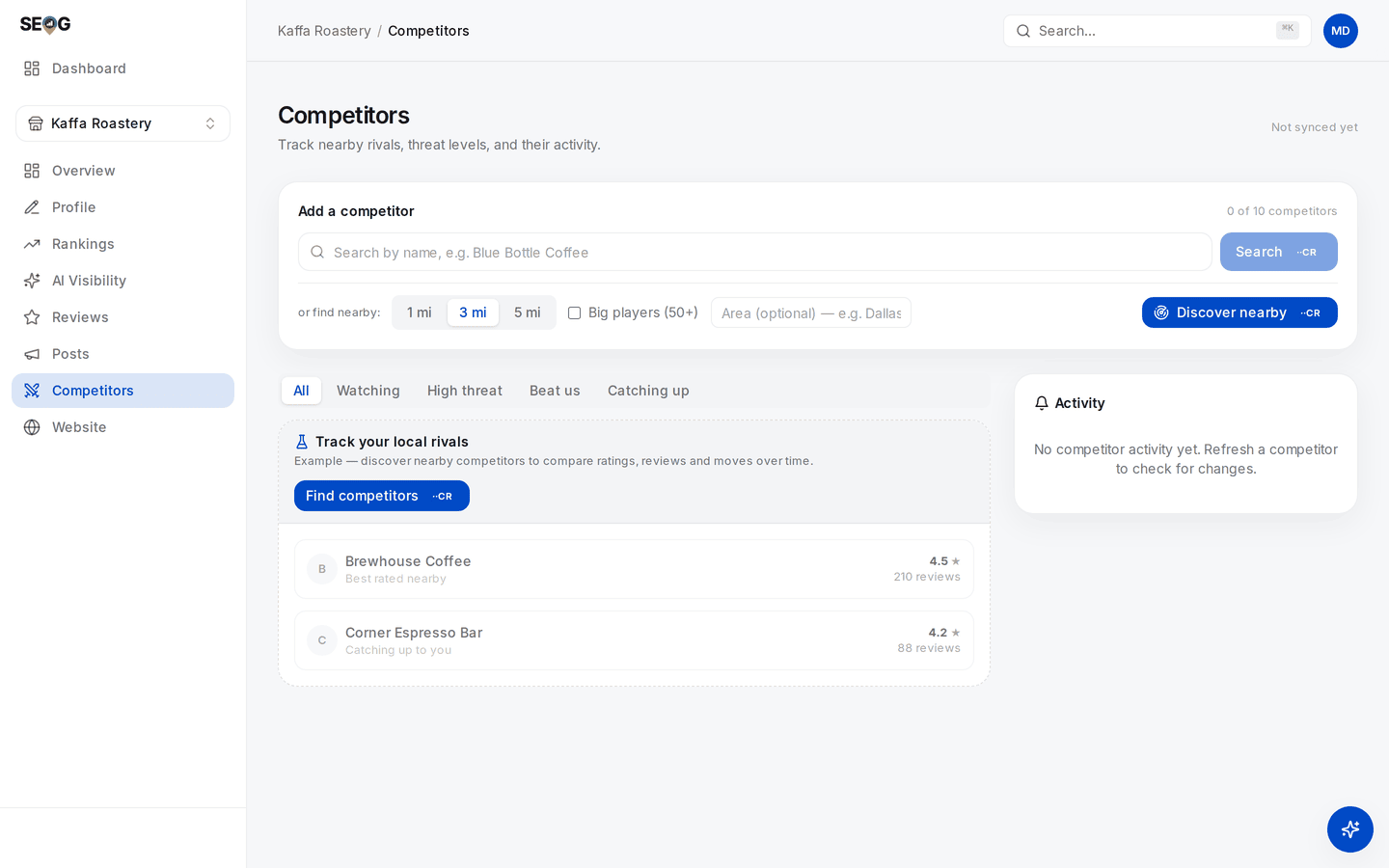
Competitors before anything is tracked. Discovery is the top card — radius chips, Big players (50+), and the optional Area box for a business with no map point — and the filter row above the list is where Beat us and Catching up live. The two coffee shops underneath sit under an Example header: the interface illustrating what a tracked rival looks like, not real rivals and not real numbers.
- Open Competitors. In the Add a competitor card, find the or find nearby row: radius chips 1 mi / 3 mi / 5 mi, a Big players (50+) checkbox, an optional Area box. Leave the radius at 3 mi. If your business has no map point (a service-area business), type a town into Area — otherwise the search has no centre.
- Press Discover nearby: a live ranked search, priced on the button.
- Read the summary line above the results first: either
You rank #N in this search — anything above that line already beats you, or that you did not appear in the top 20, meaning everything listed outranks you. That sentence is the finding. - Read each row's rank chip —
#7 · above you (you #11). Where a rival also appears in your stored rank checks, a second line reads like beats you for 2 of 3 tracked keywords it appeared in. Treat that as a floor: a rank check records only the top three rivals it saw, so a rival that consistently sits fourth leaves no trace there at all. - Press Track on three rivals that genuinely contest you: above you here, same primary category, inside the distance your customers travel. Not the three biggest names in the city.
What good looks like. Three tracked rivals — at least one that outranks you, at least one you outrank — plus a sentence per rival naming which force they win on.
If it went wrong. A thin list means the radius is too small or the category unusual; widen to 5 mi and discover again (another paid search). A list of one-review listings is what Big players (50+) is for. A named rival that never appears is what the by-name Search box is for — also paid, returning no rank position.
What you just learned. The ranked list already answers "who is above me" — the order is the measurement, and reading it costs nothing extra.
Lab 16.2 — Snapshot, then read the comparison
Lab · Where: Competitors (
/b/{businessId}/competitors) · Cost: paid, then free reads · Time: ~15 min, plus a revisit next weekYou need: Lab 16.1.
- On each tracked competitor card, press Refresh — a live fetch of their rating, review count and photo count, priced on the button.
- The card now shows a level and no deltas. Correct: one snapshot is not a trend. Diarise a second pass in a week — after seven days the page offers a section-wide Refresh competitors for the whole set at once.
- Read You vs. competitors (N) in the right column — free, from stored data: Rating, Reviews and Photos, each with your value, the set average and the best rival's. Then read To beat them and write those numbers down — they are your targets for reviews and photos.
- Read Competitors offer — you don't. For each chip: do we offer this? Every yes is a profile fix, not a competitive gap.
- Read the Market positioning scatter. You are the ★; top-right — more reviews and a better rating — is the quadrant that matters.
What good looks like. One sentence diagnosing the set, with numbers: "I lead on rating by 0.2, trail the average by 40 reviews and 12 photos — the constraint is volume, not quality."
If it went wrong. No comparison card means nothing is tracked yet. A rival with a blank name has aged past the storage window and needs a refresh. Deltas that stay empty mean only one snapshot was ever taken.
What you just learned. Levels are free to read forever; slopes must be bought once, then recorded.
Lab 16.3 — Run the spam scan and classify every finding yourself
Lab · Where: Competitors → Spam check (
/b/{businessId}/competitors) · Cost: free · Time: ~15 minYou need: Lab 16.1 — at least one tracked rival.
- Find Spam check in the right column. It reports how many rivals it scanned and how many are worth reviewing, and makes no external calls.
- Before reading its labels, score each flagged rival by hand with the weights table above.
- Compare with the panel's label — Review or Likely spam — and note any disagreement.
- For anything you scored 5 or more, verify: search the exact name in Google Maps, check the address on street view, call the number.
- Write a one-line verdict per rival: legitimate, sloppy, or likely spam, verified. Only the third is worth reporting.
What good looks like. A short list where you disagree with at least one machine verdict and can say why. A heuristic you cannot overrule is one you are not using properly.
If it went wrong. "No spam signals" is a common, legitimate outcome, not a failed scan. If everything is flagged, check whether you tracked several branches of one chain — that trips the duplicate signal by design.
What you just learned. Spam detection is scored evidence, not a verdict.
Lab 16.4 — Take the competitive set the AI picked
Lab · Where: AI Visibility (
/b/{businessId}/ai-visibility) → How AI recommends you · Cost: free · Time: ~10 minYou need: at least one live AI answer check run from the keyword × engine matrix (Lab 5.1 tours that screen).
- Open AI Visibility and scroll to Who AI recommends alongside (or instead of) you. Each row: a name, its answer count, and — where the name could be classified — a tag reading Local, Chain or Platform. Unclassified names carry no tag; they are not a separate category, just an unresolved one.
- Cross off every name you already track. What remains is a competitive set you did not choose.
- Move the Platform rows to your citations worklist; they are sources, not rivals.
- Track the one or two most frequent Local names (paid), then ask whether they appear in your map-pack set at all.

This is the page before a single live check has run, and it says so: every headline figure carries an EXAMPLE badge, and How AI recommends you reads "No recommending answers judged yet". Nothing here is a measurement of this business — the co-mention list this lab is after only exists once you have paid for real answers.
What good looks like. At least one name here that never appears in your map pack. If the two sets are identical, that is also a finding: the engine is reading the pack, so your pack work covers both surfaces.
If it went wrong. An empty list means no answers have been judged as recommendations yet; check more keywords. If the section shows clearly-labelled example numbers instead of your data, live AI checks are not on your plan — Lab 5.3 is the by-hand version.
What you just learned. An AI answer check is two deliverables for one spend: your presence, and a competitor list the engine picked.
Without SEOG. All four labs work by hand: Google Maps for pack order, categories, ratings, review counts, photos and attributes; a spreadsheet with a date column for the slope; the spam table needs only eyes; the co-mention list needs an assistant and five identical prompts. What you lose is the recording discipline — exactly the part that fails. Doing it without SEOG is the long version.
Common mistakes
Tracking the biggest business in town. Their threat score pins at 100 and never moves, and nothing you learn is actionable. Track one tier above you and one below — the tier below is where the surprises come from.
Copying a rival's primary category because they outrank you. You are crediting one variable for the output of many. Uniform categories across the pack with yours the odd one out is evidence; a single rival is not.
Reporting a listing because a tool flagged it. Redressal burns credibility when it fails. Verify by hand, keep the evidence, report only what you would defend.
Check yourself
- Name your three competitor sets and one member of each that is in no other. If all three lists are identical, you have built only one of them.
- A rival scores 82 on threat. Give the two likeliest breakdowns. (Rating edge plus double your volume — established, slow to move. Or moderate volume plus full momentum — a campaign running now, the urgent one.)
- Which rival is "catching up", and how is that different from "beats you"? (Catching up: smaller than you on review volume, and either gaining reviews, gaining rating, or already at or above your rating. Beats you: a higher rating, full stop. A rival can be both, or neither.)
- A listing in your pack has a stuffed name and no website. Do you report it? (No — 3 + 1 = 4, below the escalation threshold. Watch it; report when a second signal appears.)
- A rival's review count jumped 40 in a week. Name an innocent explanation before you reach for the guilty one. (A request campaign after a backlog, a seasonal surge, or a filtered batch released. Purchased reviews is the claim that needs evidence.)