Labs: classify the business, build a rank-free scoreboard
The three labs below run the argument on a real account: classify the business by what Google shows, buy the all-grey proof once, then build the scoreboard that replaces rank.
Labs
Lab 19.1 — Classify before you measure
Lab · Where: Overview and Profile (
/b/{businessId}/overview,/b/{businessId}/profile) plus Google Maps in a browser · Cost: free · Time: ~10 minYou need: your practice business added (Lab 0.3).
- Open the business overview. Read the line under the business name in the page header. A street address looks like one; a service-area business shows a place name, often with a
+N moresuffix — a list of declared service areas, not an address. - Open Profile and follow the View on Google Maps link in the contact rows.
- On the Google listing, look for either a street-address row with a pin, or a line stating the areas served and no address at all.
- Classify, and write the verdict at the top of your notes for this account: storefront (address, no service area), hybrid (address and areas served), pure service-area (areas served, no address).
- If it is pure service-area, add one line: "map-pack rank is not measurable for this business" — and from here on treat every rank figure you meet for it as an artefact.
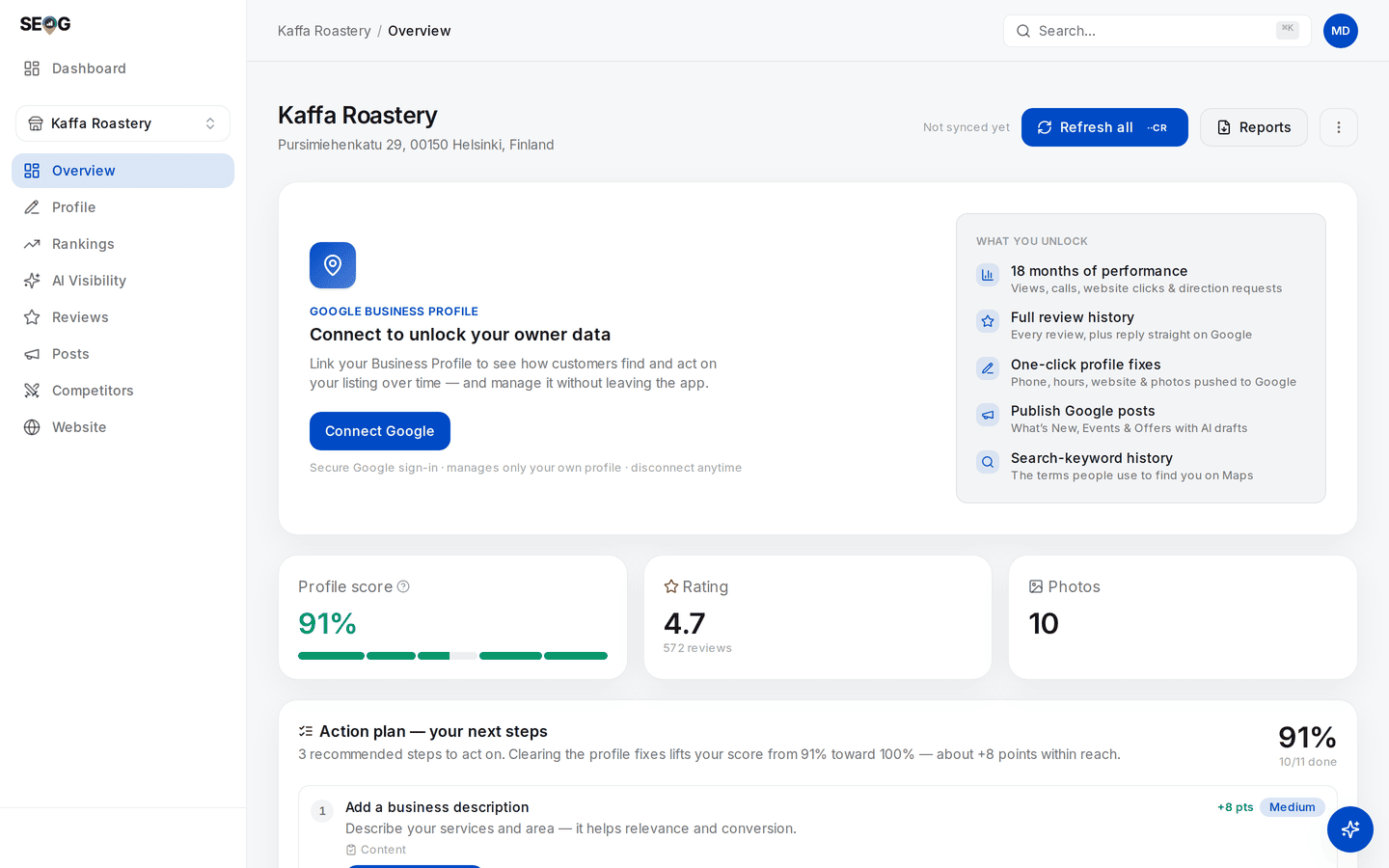
Step 1, on a storefront: the street address printed under the business name is the whole classification, and Part II applies to this business unchanged. A pure service-area business shows a place name on that line instead — often with a +N more — and no street address anywhere on the page. Which of the two you are reading decides which measurements exist for the account.
What good looks like. A one-word classification you could defend by pointing at the owner's own Google listing, in a note that survives to the moment somebody asks for a ranking report.
If it went wrong. The overview header shows only a city: the business came in through the owner connection and Google has no public record matched to it — itself strong evidence of the pure case. There is a street address on Maps but the owner insists they are mobile: they are a hybrid. Believe Google, not the self-description.
What you just learned. Classification is a measurement decision, not a profile detail. Get it wrong and every number downstream is either the wrong number or no number, and you cannot tell which.
Lab 19.2 — Buy the proof once
Lab · Where: Rankings (
/b/{businessId}/rankings) · Cost: paid · Time: ~5 minYou need: Lab 19.1, with a verdict of pure service-area. If your practice business is a storefront or a hybrid, do not run this — read What good looks like below and move to Lab 19.3.
This lab spends money to produce nothing, deliberately and exactly once. The alternative is producing nothing accidentally, every month, on a client's budget.
- Track one keyword the business genuinely competes for — a service plus nothing else. Adding a keyword runs a first rank check, so a result appears immediately.
- Read that result. The keyword's row in the list shows
—; open it and the headline reads Not ranked, with a line beneath the Check now button naming whoever holds #1 instead of you. - Select the keyword to open Geographic visibility. Choose the Quick preset (3×3, 9 searches — the smallest) and press Check now.
- Read the finished scan whole: the nine pins, both summary sentences, Avg rank, Top-3 coverage.
- Write the detail sentence down verbatim, and underneath it why its advice cannot work here.
- Do not run a Standard or Detailed scan. A larger lattice of the same nothing costs more and teaches less.
What good looks like. Nine grey pins. Headline: Not visible across this area yet. Avg rank —, Top-3 coverage 0%. And a detail sentence recommending reviews and profile keywords, which you have written out and refuted.
If it went wrong. Some pins carry numbers: the business is a hybrid, not a pure service-area business — redo Lab 19.1, and note that the rest of this chapter does not apply. Nothing seems to change after the scan: check the timestamp beside the map, because you may be looking at an earlier cached scan.
What you just learned. An all-grey grid has two causes that look identical — uncompetitive, or unmeasurable — and no statistic computed from the grid separates them. Only the classification does, which is why it came first.
Lab 19.3 — Build the scoreboard that works
Lab · Where: Overview (
/b/{businessId}/overview) · Cost: paid · Time: ~15 minYou need: Lab 19.1, and a business connected to its Google Business Profile — a pure service-area business will have been added that way, since it is the only route that works, though the connection can be dropped later from the same card that made it.
- On the overview, find the performance panel and press Load performance data. The price is on the button. One charged click buys the full history; switching periods afterwards is free.
- Read the metric tiles: profile views, website clicks, calls, direction requests, messages, bookings. Note which are zero and say why — direction requests near zero is the correct result for a business with no address.
- Switch the period to 12 months and read the shape of the trend, not the last week. The switch is free; only the load was charged.
- Find the search-keywords card — the terms people typed to reach the profile. If it shows a single trailing-year total per term, a Load trend button is offered: press it to buy the month-by-month history.
- Mark every value rendered as
<N. Those are Google's privacy thresholds, not counts. Write the rule: thresholded rows are reported as thresholded, never summed into a headline figure. - Write a dated baseline of six lines containing no rank: date, profile views, calls, website clicks, review count, rating. Save it beside the frozen baseline from Lab 7.3.
What good looks like. A dated six-line baseline with no position in it, the top search terms with thresholded rows flagged, and one sentence stating what this data cannot tell you — where any of it happened.
If it went wrong.
- The panel offers to link a location instead of loading. The Google connection is not bound to a location — check which business you are on, and that the connection made at import is still in place.
- The keyword table still shows one total column and no monthly trend after Load trend. Google returned a trailing aggregate rather than a per-month series, and the app correctly declines to invent months from it.
- Everything reads zero. A quiet profile is a finding, not a failure.
What you just learned. Losing rank as a metric costs less than it feels like, because what replaces it is closer to the outcome the client is buying. What you lose irreplaceably is geography: no dataset available to you says where the calls came from.
Common mistakes
Reading an all-grey grid as bad performance. It is not a position. Telling a hidden-address client "we're not ranking anywhere" is a factual error, and the correction — that the number never existed — is a far worse conversation six months in than on day one.
Selling map-pack rank to a service-area client. The commonest version is unexamined rather than dishonest: the proposal template has a rank section, the trade happens to be a hidden-address one, nobody classified it. That is what Lab 19.1 is for.
Adding a street address so the tools work. A guideline violation, a well-known suspension cause, and a way to put the listing you were hired to grow at risk of removal — in exchange for a number that was never the deliverable.
"Add more service areas and we'll rank in more towns." Google publishes no mechanism by which a declared service area changes ranking, and this manual has verified none. Treat it as unproven in both directions — and note that claiming an area you do not serve breaks the guidelines anyway.
Comparing a service-area business to storefront rivals on rank. The competitor list is real — those businesses genuinely rank there — but your client has no row in it. Use it to read the bar (ratings, review counts, who holds the top three), never to imply a position relative to it.
Check yourself
Answer against your own practice business, or a service-area business you can look up.
- Which of the three shapes is it, and what did you look at to decide? "The owner told me" is not an answer. Google's listing is.
- A grid comes back entirely grey. Name the two causes and the one piece of information that distinguishes them. If your answer involves the grid itself, re-read the first wall.
- Someone shows you a rank map for a hidden-address plumber. What do you say? At minimum: which family of tool produced it, and why the gradient has no defensible interpretation even if the pins are real.
- Your service-area client asks "are we ranking better than last quarter?" Give the honest answer and the three numbers you offer instead.
- Profile views are up 30% quarter on quarter. What can you not say about that number? At minimum: nothing about which town it happened in, and nothing about position.